
Archive for category Social Networking
Social Media Monitoring : Radian6 vs. ScoutLabs
Posted by Rory Martin in Social Networking on September 22, 2010
Ever since I reported on the launch of Scout Labs, I have had people ask, fairly or not, how it compares with Radian6. It’s no secret that I use Radian6 at Doe-Anderson, am good friends with many of their employees and have recommended them to people left and right for a long time. Scout Labs appeared on the scene in February after two years of testing and development and they have a very nice social media monitoring tool.
To be completely fair, it should be noted that the two companies have slightly different target audiences, strengths, technologies and approaches. Scout Labs is a self-serve, web-based tool priced for small to mid-sized business and brands. Radian6 was originally positioned as an agency model where a single ad agency that worked with many brands could economically offer social media monitoring to its clients. It quickly moved on the market thirst for social media monitoring and expanded their approach beyond ad agencies and PR firms, but they are probably best suited for medium to large sized brands and businesses.
Still, if there is something to be had with Scout Labs for a better price, we ought to know what it is.
So, while setting up and monitoring mentions of a Louisville-area heath care system recently, I composed this comparison on setup, features and price. I chose the health care system because they have several different locations, thus potential keywords to search for, but weren’t a typical “national” brand so the volume would be manageable. Here’s what I found:
Radian6 offers a very simple setup. You start a “Topic” and add keywords. For billing purposes, you’re billed for each “Topic” so all of your searches need to come under that topic set up or you’ll pay more. I added several different keywords based on the name of the health care system and one of their locations. After testing the results returned, I quickly had to add some omission filters for a popular actor who has apparently appeared in several movies about hospitals and shares a name with the brand in question.
Still, the whole set up took 10 minutes. I’ve used Radian6 for a while, so it was familiar territory, but it is fairly easy to understand and navigate once you’ve had the tour from a Radian6 rep. (I wouldn’t say it’s particularly intuitive if you’ve never been in it, but it’s not hard to grasp.)
Just minutes later, I had a “River of News” that revealed 54 posts from the world wide web related to the health care system. You can sort that river in a number of ways to prioritize how you respond or weight the posts. A few clicks later, I had a topic cloud of popular words from those posts. With a few minutes of set up, I had some charts and graphs of some keywords I compared to see the volume of posts related to thinks like, “long wait time,” “terrible service” and “great service.” In Radian6, you can essentially compare any number of topics or keywords against one another, pulling frequency data from your river of news. You can also pull topic clouds or segment that division of data … they really allow you to slice the data any number of ways. Again, you need a little training to know how — even though all you do is click on the word or the bar graph to dive into it, you don’t get that from just looking at it — but once you do, you can slice more than a Benihana’s chef on speed.
Radian6 also produces an influencer report which gives you the most influential authors or sources from your river of news. This is good information to have, though the data is skewed a bit by the limits of your time frame (mine was set for the last 30 days). Still, I love the way Radian6 has added individual Twitter users as “influencers” on the chart. That is much more relevant to the live conversation of the day than which blog mentions the brand more.
Something new Radian6 has added to their River of News view that turns their tool into a much more actionable platform for brands and marketers is the Workflow view. You organize your River of News into a work space that allows you to mark posts for follow up, assign that follow up to team members and make the results actually work for you. Yes, this is a manual function, but one your company will want to use and participate in because it allows you to use your monitoring to realize results and proactively engage those voices talking about your brand.

Radian6 Workflow view with actionable step links to the left.
This particular interface and function of Radian6′s tool would take me a complete second post to tell you about all the features and strengths. There’s tie-in with Google’s social graph API, automated alerts for subjects (giving you Google Alerts on steroids), tagging and activity logging of contact with specific bloggers, a completely mind-boggling integration with Twitter to manage communications with an influencer on that particular network. Oh, and you can have all your “River” results pumped to you via instant messenger so you are never out of touch with what’s being said about your brand.
Frankly, this dashboard functionality blows all other competitors in the social media monitoring space out of the water. If you’re paying hundreds of thousands of dollars for the big boys, you’ve lost your mind. This alone beats them, hands down. (Unless, of course, you just have to have the 56 page PowerPoint with mindless pie charts no one reads.) For medium to small brands, however, it’s overwhelming and impossible to manage or use all the functionality without spending hours a day using Radian6 (which is, I’m sure, what they’re hoping for). The reason I say that, however, is that there’s normally just one or two people managing all this for smaller brands and that isn’t their only role. This is a tool best used by teams of communications staffers.
Oh, and the ability to slice and dice the data in Radian6 is just sick. Once you know how to do it, you’ll swear by this tool.
The only bad thing about my Radian6 experience is that it crashes my browser in Firefox. Maybe it’s too powerful. It works fine in Safari, so I just use it there.
That said, the Radian6 scorecard of results showed 54 total items found, including 17 posts from Twitter, two videos and four images.
In Scout Labs, I set up a “Search” much like the “Topic” in Radian6. The keyword or exact phrase setup was a little disappointing until I got them on the phone and asked about it. They were nice to (politely) point out there’s a big “Click here for help” button that I missed. What can I say? I don’t read instructions.
In order to play out the clumsy usage like the average person would, I used the brand name, then the word “Healthcare” and the name of one of the brand’s locations as qualifiers. (“Relevant” in Scout Labs terms.) Unfortunately, that set up yielded over 10,000 posts. Even adding all sorts of qualifiers (the actor’s name as an omission, etc.), I could only get it down to 8,500 posts. So, I set up one search for, “Brand Healthcare” and “Brand Location” where the brand and location are obviously specific to this particular organization. There was no real way to mash those results up (keeping in mind I didn’t read the instructions on how to do so), so I did that manually for comparison sake.
Once that was done, the information produced included 72 total items found, including 23 posts from Twitter, 22 videos and 18 pictures. For the record, I ran it the way I should have (having read the instructions) and the numbers and content were all but identical.

A sentiment trend view from Scout Labs.
Once you’ve set up your search in Scout Labs, within seconds and a couple of clicks you have charts and graphs for volume of articles, share of voice compared to competitors you may set up to track as well and the kicker – automated sentiment so you know if the talk about you is good, bad or neutral. Since this is manually scored in Radian6, you just saved yourself a fair bit of time to produce a sentiment report, though it requires that you trust the automation. (I highly recommend manually checking any sentiment score from any service until you’re confident they’re accurate or you can at least live with the ratio of right to not-so.)
Scout Labs also separates results out by medium, giving you a tab to see posts or conversations and separate tabs for photos, videos and Twitter. With Radian6, they’re all together in your stream, though easy to delineate. You can delete or remove posts you don’t want considered very easily using both tools. Instead of a topic cloud, Scout Labs lists popular words discovered in your stream and goes the added step of indicating which words are new in the last 30 days. This gives you a quick and automated glance at what topic might be trending or a sore spot that consumers are complaining about.
Comparing the results, it’s clear that Radian6 has a much more thorough scan of the web. News items posted on WFPL.org, the website for the local NPR affiliate, were not picked up by Scout Labs, showing some apparent holes in their scans. They also don’t do a good job of catching message boards and forums, though I’m sure that will improve over time. Radian6 didn’t do that well with forums a year or so ago when I first saw their platform. They’re better now.
Of the nine posts returned by Scout Labs, Radian6 only had three of them, and while the tool should have found them, I would only consider one of the six relevant to the search as three were job postings and the other two appeared to be spam sites. While I’m not sure why there was an inconsistency in the number of Twitter messages returned, it may have something to do with spam/duplication filters. The entries Radian6 failed to return appeared to be re-tweets or exact duplications of bot-controlled feeds.
Scout Labs did out-perform Radian6 by returning lots more videos and images. There was a Flickr set of 17 images I found through Scout Labs of a newborn baby that wasn’t in the Radian6 filter, all tagged with the hospital’s name. However, none of the four images Radian6 returned, all of which were relevant, were to be found in the Scout Labs data.
Tit-for-tat comparison’s are relevant but not altogether conclusive, however. The thing that often sets the tools apart is the ease of use and quality/quantity of data returned. Scout Labs offers a more seamless experience in a web-based environment while Radian6 is a Flash interface. It can be clunky and slow, though it is noticeably faster now than in months past. Radian6 allows you to produce topic-related comparisons easier than Scout Labs, in my experience. And, as I’ve indicated, the Workflow tool in Radian6 is simply unmatched in anything out there. It alone is worth the cost of the service.
And while Radian6 has the powerful play of the Influencer Report, which now includes Twitter users in its consideration set (a far better insight than just blogs that mention the brand most often), Scout Labs counters with the trump card of automated sentiment scoring. It is currently time consuming to manually grade sentiment in Radian6. Even though the brand in question only returned 54 posts, it would have taken about an hour to go through each one, read, score sentiment and so-on. In Scout Labs, if I trust their tool, it’s done.
For the record, according to my friends at Radian6, automatic sentiment scoring is coming and soon. Until it does though, Scout Labs has that as a selling point.
While I’m not well-schooled in the back-end technology lingo, Scout Labs uses indexing which, as I understand it, is more nimble and flexible than database-driven information. Radian6 uses a combination of indexing and database technology. Is that a sticking point for them in the long, run? I don’t know and would love some technologists and engineers to chime in. Seems like both companies have good engines and continually improve what they have, so both can give each other good runs for the money for a while. I promise to do more research here to edu-ma-kate us on the differences.
So from a power perspective, I give the edge to Radian6. Both the Workflow panel and their breadth of data collection sets them apart. Scout Labs can probably catch them on the data collection pretty quickly but duplicating their Workflow panel will be tough to do knowing Radian6 is always improving their own tool as well.
From a data perspective, Radian6 also stands out because of their breadth of data, the Influencer report and the data slicing and dicing ease of their tool. (Did I tell you it’s just sick? Sick!) Still, it’s a close call because of Scout Lab’s automated sentiment scoring, which is a big time-saver and important when you consider the good vs. bad is sometimes all a brand manager or CEO wants to hear.
But when you look at price, Scout Labs wins. They don’t limit the number of users \and offer monthly plans starting at $99 (enough to handle a single brand or small business with monitoring of 3-4 competitors). For $249 monthly, you get more searches for competitors or divisions of your business. This would be the price point for the health care system I used. The most you’ll pay for Scout Labs, unless you have a large, customized solution, is $749.00 monthly. That’s almost the entry point for Radian6, which is a volume-based plan with 10,000 “posts” as the lowest price point at around $600.00 per month. And you’ll need to be very meticulous about defining your keyword. If I hadn’t eliminated the actor’s name from Radian6′s scan, I would have been automatically bounced up to the more expensive plans at the end of the month. (Though I can attest, Radian6′s folks will notice inconsistencies and call you to make sure you’re aware you have exceeded your post limit.)
So you get a better price with Scout Labs, but not as thorough a search. Radian6 has what is essentially internal project management software for response management, but Scout Labs offers automated sentiment.
And both firms have a strong footing in customer service and innovating based on their technologies. So both will evolve and get even better at what they’re doing. Radian6 today is far better and vastly different than they were a year ago. Scout Labs is going to trump even themselves in a month or so with new features and broader reach with their searches.
In the end, the decision is going to be unique to each organization or business, so it’s up to you to decide.
If you’re a small business or on a tight budget, Scout Labs is well worth the investment. If you have a little bit more money to spend and want to see a more powerful tool put to use for your brand, Radian6 might be a better fit. But both are infinitely useful and worth the time and money. And both will get better.
As a matter of point and disclosure, allow me to say that I have the utmost confidence in both of these services. I’ve paid a personal visit to Radian6 and am good friends with many of their employees, including CEO Marcel Lebrun. In my brief time getting to know Scout Labs CEO Jenny Zeszut and product VP Margaret Francis, it’s clear they know what they’re doing and are offering a valuable service at a very competitive price point.
Now it’s your turn. If you use one, the other or both, please fill us in on your experience. What do you like? Dislike? What could either do better? They’re monitoring firms, so you can bet they’ll be anxiously awaiting your feedback. Scout Labs is new, but they have a 30 day free trial. Go sign up and let us know what you think. The comments, as always, are yours.

Study Shows Time Pays With Social Media Marketing with RoryMartin.com
Posted by Rory Martin in Social Media Marketing, Social Networking on May 21, 2010
Have you asked this question: Is the time I invest with social media really worth it? Whether you’re new or an old hat with social media, chances are you’ve wondered if the time commitment is really worth the return on investment (ROI).
Make no mistake about it: a true investment of time and resources is necessary to see significant social media marketing success.
But the real question is, “Just HOW MUCH time is needed to see solid success?”
This question was recently answered in the new study, 2010 Social Media Marketing Industry Report, authored by Michael Stelzner. Based on the report findings, ROI is top of mind for most marketers using social media.
Top Social Media Questions Marketers Want Answered
According to the data, the number-one question marketers most want answered is how to track social media ROI. A sampling of questions includes:
- How can I tell a convincing story to management about the ROI for social media marketing?
- What are the key metrics to follow for measuring ROI in terms of customer satisfaction, revenues and brand loyalty?
- How effective is social media versus the resources needed to maintain the effort?
- Are there any industry benchmarks that track the impact of social media marketing?
In the 2009 study, the number-one question from marketers was related to social media tactics, followed by ROI. Now tactics have moved down considerably and the ROI question has moved up. One reason for this could be that social media is maturing and more people have started using the tools and tactics. Now they want to know if the long-term payoff for their time and resources is really there.
Time Versus Return for Social Media Marketing
When looking at ROI, you also have to look closely at just how much time you’re investing. Unlike some other traditional forms of marketing, when it comes to social media, your investment is more time than money.
The industry report results shed some light on the amount of time marketers are really spending on social media marketing.
Out of the 1900 marketers’ responses, almost all were using social media for marketing purposes and the majority of these marketers were fairly new in the social media area.
- 91% of respondents indicated they were employing social media for marketing purposes.
- 65% of marketers have either just started or have been using social media for only a few months.
When drilling down to the actual hours spent using social media tools, the largest group was in the 1 to 5 hours per week range. Of that group, 43% are spending 4 to 5 hours each week on social media activities. A significant 56% of marketers are using social media for 6 hours or more each week and 30% for 11 or more hours weekly. It’s interesting to note that 12.5% of marketers spend more than 20 hours each week on social media.
This chart shows the overall breakdown of marketers’ time spent using social sites.

But even more interesting than the time spent on social media marketing, the report also showed a correlation between the amount of user experience and the time spent using social media tools. The median weekly time commitment for beginners was 1 hour versus 10 hours for those doing this for a few months or longer. Because 65% of respondents indicated they were newbies or just a few months in, much of their time spent on social sites could be more trial and error than solid strategy. Perhaps the difference in time spent using social tools is because the marketers who have the most experience also have more well-defined social media strategies, allowing them a clear plan of action on the social sites.
Just like with anything else, experience is golden. The more user experience one has with social media marketing, the more valuable every minute spent on social media sites becomes. The time spent on social sites is not as important as the actual results. What we really should be looking at is what kind of results are you getting for that 1 hour, 4 hours, even 12 hours per week?
Top Benefits of Social Media
When the respondents were asked about the benefits they’ve received from social media marketing, there were some clear winners that stood out above the rest. When looking at ROI on social media marketing, money in the bank can’t be your only indicator of success. Increased traffic, lead generation and happy, connected customers all are factors in deciding which social media strategies are working best for your business.
According to the survey, the number-one benefit of social media marketing is greater exposure (85%). Improving traffic and building new partnerships followed next. More than half of marketers indicated a rise in search engine rankings was a benefit of social media marketing. The report states, “As search engine rankings improve, so will business exposure, lead generation efforts and a reduction in overall marketing expenses. More than half of marketers found social media generated qualified leads.”
This chart shows how respondents viewed the benefits of social media marketing.

Outsourcing Social Media
Because time and ROI are such a central focus for many marketers, it was surprising to see that very few were outsourcing their social media efforts. According to the report, some factors may be that social media outsourcing is fairly new and the majority of respondents were new to social media, perhaps yet unaware of what they should and should not be outsourcing.
The chart below shows how the majority of marketers are not outsourcing their social media activity.

Where we’re seeing the outsourcing trend is in the larger organizations. According to the report, “the larger the organization, the more likely outsourcing is taking place. For example, 25.7% of large businesses and 25% of mid-sized businesses are currently outsourcing, compared to only 10.6% of sole proprietors.” Like many marketing trends, what starts with the “big guys” tends to make its way to the smaller businesses—therefore, we may be seeing more outsourcing overall in the coming year.
Check out the full report here.
Now it’s your turn! Do you feel your time using social media marketing is worth the return? Does your own experience match up with the results? Share here—we want to hear from you!
For Social’s Sake: Managing A Brand With Socialized Communications
Posted by Rory Martin in Social Media Marketing, Social Networking on May 5, 2010
Don’t let your brand be a social outcast. Especially in Seattle, NY, LA, and Portland

It used to be that brands sought partnerships with publications to publicize their offerings, host events or write about their products. And many publications did and still do an excellent job at providing these services to help promote a company’s products to specialized audiences. However, the dynamics of buying and selling has shifted the power from the media over to the brand and consumer.
Now, in order to launch a new product, a brand needs to extend its identity in many more channels and to many more audiences. Thus in addition to promoting itself in worthy publications, a brand must have a strategic digital marketing strategy, a solid list of target–and often splintered–consumers, and a multitude of social networks to engage them. Many marketing activities are now direct-to-consumer instead of company-to-consumer. In fact, new research predicts that spending on Internet-based marketing is expected to overtake print ad budgets in 2010 for the first time. For these reasons, traditional media is now adapting to this new marketing reality.
Today’s savvy consumers will respond to a brand that speaks to a need they have identified, resonates with them on an emotional level, or solves a problem that they maybe didn’t even know existed. Brands today are actively harnessing social media platforms to create content and communities to find their brand loyalists or advocates. Once identified and engaged with, brand advocates do the marketing campaigns for them. These brand advocates might enter an online contest to help name a new product or create a new food flavor that then gets produced and distributed. They may select music they want to appear in a videogame. And they can decide to tell all of their friends and networks about how they have taken control of their brand relationships in this new marketing paradigm.
The new model of targeting brand ambassadors is about two-way, open, social engagement and not just top-down and inside-out pushing of products. It is as much from the outside in–from consumers back to the brand. While most brands are implementing social communications programs using one or two social platforms, only a handful are thinking holistically about managing communications across all media and touch points. The requirements are now to communicate who you are as a brand and what you stand for through social media in a far more consistent, strategic and global way. After all, unlike traditional media, online content and experiences are inherently open and accessible everywhere around the world.
RoryMartin.com helps clients educate their markets and build brand awareness while winning and retaining customers with engaging and impactful websites and web marketing. We offer a comprehensive set of services from website design and web development to search engine optimization and search engine marketing and social media marketing.
Conenza stands to lead the way in 2010 for social networking platforms
Posted by Rory Martin in Social Networking on September 26, 2009
 |
| White-labeled alumni networking platform Conenza builds and manages collaborative online communities for multi-billion dollar organizations and their alumni. Key features of the Conenza alumni community platform include: searchable, self-maintaining alumni directory; core community services including news, networking, events, jobs and resumes, & marketplace; compliance with corporate privacy policies, secure platform administration, content management, and reporting tools. |
RoryMartin.com new site is live – Please stop by and check out the portfolio
Posted by Rory Martin in Search Engine Optimization, Social Media Marketing, Social Networking on September 16, 2009
I am excited to launch the new site. We used Joomla, Yootheme, as well as a few other plugins for social media tools.
If you haven’t seen it please check it out: RoryMartin.com
Next month we launch SeattleSocialMediaMarketing.com and LegalSocialMediaMarketing.com
What Exactly Do 1.6 Billion Retweet Buttons Get You? About 6 Million Actual Retweets.
Posted by Rory Martin in Social Networking on August 21, 2009
As a Seattle Web Design company that specializes in Seattle Search Engine Optimization and Seattle Social Media Marketing, we recommend using reading Techcrunch.com to stay up to date with what’s going in in technology. I read it and almost every day say to myself…man I’m glad we have it.
Original source link from Techcrunch.com
If you look at the top right hand corner of any blog post on TechCrunch, you will see both the number of comments on it and the number of times it’s been retweeted (linked to and passed around on Twitter). Usually the retweet number is bigger than the number of comments because it is much easier to do. It counts as a vote for that post inasmuch as a passed link can be construed as a reader recommendation. Everyone who retweets a link is in effect recommending it to all of their followers, and it can help to drive traffic back to the original post. At least that is the theory.
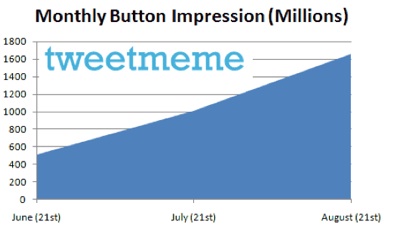
But how many retweet buttons are actually out there and how many people click on them? When it comes to the spread of the buttons themselves, TweetMeme offered some stats today showing that its retweet buttons are now getting 1.6 billion impressions a month. That number has quadrupled in the past two months alone. New retweet market entrants have a lot of catching up to do. And Just wait until retweet buttons start appearing on individual comments as well.
What that means, however, is just that the buttons are appearing on blog posts and articles which collectively are viewed 1.6 billion times a month, not that they are clicked on that many times. I asked Tweetmeme founder Nick Halstead how many actual retweets do those buttons produce. He doesn’t have exact numbers for that yet, but his best guesstimate is 200,000 a day, or 6 million a month. That translates into a paltry 0.375 percent click-through rate.
There are a few caveats about this number. It doesn’t count people who click on the retweet button who are not members of Twitter. It only counts the overlap. So the actual number of clicks is no doubt higher. In fact, on the retweet button in RSS feeds and for people who are already logged into Twitter (which TweetMeme can measure), the click-through rate is 1 percent. But the vast majority of impressions are for people who are not logged in. So the real click-through rate is somewhere in between 0.375 percent and 1 percent.
The other thing to remember is that it can take fewer retweets to make an article go viral than, say, Diggs. Depending on how many followers each retweeter has and how many actually click on the link, a few retweets can be all it takes to drive a ton of people to that blog post. Twitter certainly drives a lot of traffic to TechCrunch, but we don’t really know how much of that is due to retweets.
TweetMeme is working on giving Websites who use its retweet button better insight into downstream traffic. Halstead also revealed that it is going to release an analytics service which measures traffic coming from retweets. He’d better hurry up with that before Twitter itself beats him to the punch.
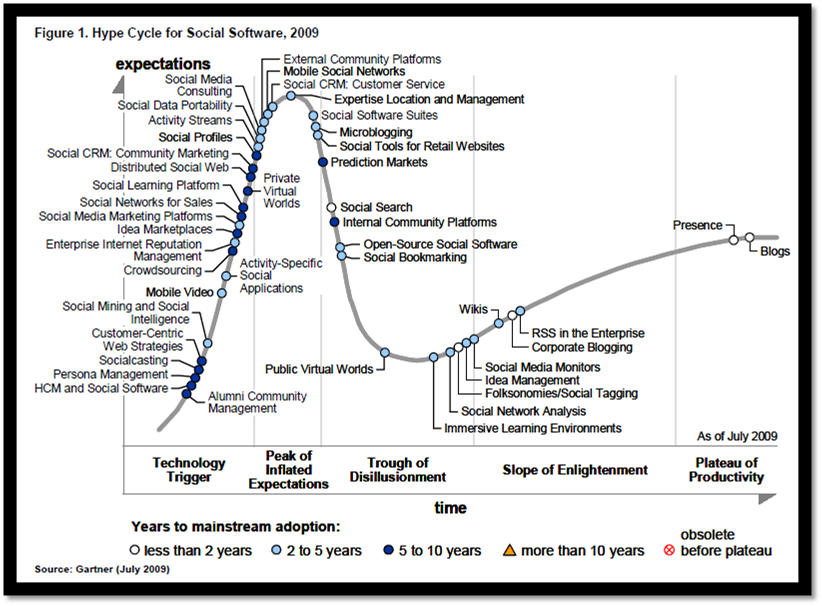
Hype Cycle for Social Software 2009
Posted by Rory Martin in Social Networking on August 21, 2009
Facebook Top 10 Rules – RoryMartin.com Social Media Marketing
Posted by Rory Martin in Social Networking on August 13, 2009
As a Seattle Web Design company that specializes in Seattle Search Engine Optimization and Seattle Social Media Marketing, we like to keep you informed and up to date on what people are saying about Social Media tools like Facebook.
Below are some goods we feel you should know about:
If you are an Entrepreneur, or a business professional, you may want to consider these 10 notes below as they will make a difference in what you do on facebook.
1) The Rule of Visibility on Facebook.
You MUST be visible on facebook of you are going to get your message out. You must spend time on facebook and get to know people. You must put yourself together a “facebook blueprint” and work it. How many hours a week are you going to be seen on FB? How many times are you going to befriend someone this week? How many times are you going to upload photos this week? All of these things put you in the ‘Visibility Zone” on facebook, and on the radar as far as people on facebook. Be SEEN and be THERE on a daily basis.
2) The Rule of the Powerful Facebook Profile.
Why would people want to get to know you? One of the first things they check out is your facebook profile. What does it say- but better yet- what does it DO? Does it make people curious and want to get to know you? Does it make them think? Does it make them smile? Does it make them see that you have Value for their life and can help change it?
Powerful facebook profiles are NOT based on what is said in your profile- but what it DOES.
Does it direct them to DO something? Does it tell them you are person they MUST know? Or someone that has a nice picture and a nice profile- with no magnetism? Put yourself OUT THERE and tell the world WHY they need you as a friend, and get them to take action towards YOU.
3) The Rule of the Facebook WALL.
You MUST use your Wall to market or message. many folks regard their Wall as a communication utility like email. It is not that. You already have a facebook email. The Wall is for you to BUILD- BRICK BY BRICK- MESSAGE BY MESSAGE- NOTE BY NOTE- VIDEO BY VIDEO- your Brand on Facebook. Every time something happens with you- it goes on your Wall. Don’t stare at the wall- CLIMB THE SUCKER and make your message the PEAK of the page- and keep yourself out there with the Wall. And answer the messages on your Wall. Thank people for sharing with you their visit or message. This will show up on THEIR wall. This will set you apart from most on facebook. The Wall is simply a BILLBOARD of what you are doing and your friends are doing on Facebook. Use it often and wisely.
4) The Rule of Your Facebook Network.
You are part of a local facebook network and you have access to that network to befriend them. I live in Birmingham Michigan, and the network i am a part of is the Detroit network. There are 640,926 people in my network that I could potentially MEET LIVE in a local place and get to know them and connect with them. You have local folks as well. Where do you find your network?
Click on “settings” and then click on “network.” You will find it there. This is a GOLD MINE of people in your local area to CONNECT and Construct new trust bridges that may lead to business down the road.
5) The Rule of the Facebook Notifications.
This is an overlooked and rarely talked about utility. Notifications are part of your “facebook email system.” Go to “email” at the top of your Facebook profile page, and then click on “notifications.”This is list of who is thinking about you, talking about you, including you in tags, and generally is pointing to you. This is a GOLD MINE of people that have PROVEN they are behind you and willing to make you a part of their Facebook experience. Pay attention to the facebook notifications. Thank them for their thoughts of you on their Wall and let them know you appreciate it. Include them as well on your tags and other activity on facebook. The notifications are GOLD and is a prospecting Vault of Leads. make sure you stay CONNECTED to them.
6) The Rule of Facebook Link Love.
The Link application on Facebookis a HOT commodity. It allows you to post a link that you like and then sends it out on the news feed that is on your home page. It picks up the image that you want on the link page, and allows it to be a LIVE link. Send out other people’s LINK and givem some LOVE. Do NOT just send out your own links. Let others do that. Find interesting links of others and send them out.
WHY? EXPOSURE for you. You will be given credit for the link. People LOVE link love. If you send out a LOT of other people’s links on facebook, they will start sending out YOUR links. Been there done that.
7) The Rule of Facebook Groups.
Join groups. Join a LOT of Groups. Start your OWN groups. The join MORE groups. Why? EXPOSURE. CONNECTION to other Group members. AUTHORITY. Start your own and be a Leader. REACH.Groups extend your reach into Facebook. MULTIPLIED PROSPECTS. There are more people in a group — then on a profile page.
Duh. Build a list in your own group and then you can become an admin and email messages to them. Make them messages of VALUE and interest.
8) The Rule of Facebook Events.
Attend events. Attend Events. and then attend MORE events. Why? It allows you to leave a message on the events page wall, and create exposure. I attend at least 2 facebookevents every week- to learn- and to network. Events can be found on the new Facebook page in the upper right under “Upcoming“-these are the events that are upcoming. One unique twist. You have birthdays under the “upcoming” tag- and you can send presents to folks. THIS will get their attention as it shows up on their wall and the news feed as well. Attend as many events as you can. make them worth your while- learn and grow from them. BUT–always leave a RSVP message about attending or not- with an encouraging message. This will show your professionalism, and caring.
Event UP! This will do you wll on facebook. Put the term “events” in the search box, and it will find every event that is going on in your network of friends- a GOLD MINE of new possibilties of business. Become a master of events!
9) The Rule of Facebook Multimedia- Videos and Photos.
People LOVE photos and videos. They are the most looked at and watched pages on facebook. Make some videos and upload them. Upload some photographs. Not only will the be seen on your wall and the facebook news feed, but also will allow you to “tag” others on these. This means that you can pick out people you have befriended and let them know you are thinking of them. And when you tag someone- it shows up on THEIR wall. Not isn’t THAT cool? It is called EXPOSURE!
10) The Rule of the Facebook NEWS FEED.
This is the big kahuna of Exposure on facebook. This gets you out to ALL of your friends and creates a massive exposure vehicle that can keep your brand in front and recognized. You also will be many times on the “featured” part of the new news feed on the right. This gives you HUGE exposure. Whatever you do, like change your status, upload a video, write and publish a note, or just comment on another person’s message on the facebook news feed- it SHOWS UP in the news Feed. Be seen- and be seen often if you are trying to brand yourself on facebook.
Yes, you need to establish relationships, and build community. But if you are going to MARKET on facebook-then you need to at least get a guideline of what and how to do it. The 10 Social Media Rules of Facebook hopefully gave you some idea in your social media marketing
Social Media in plain english by Commoncraft – RoryMartin.com
Posted by Rory Martin in Social Media Marketing, Social Networking on June 23, 2009
As a Seattle Web Design company that specializes in Seattle Search Engine Optimization and Seattle Social Media Marketing, I love sharing commoncraft vids like this…watch now.
RoryMartin.com – Use PRWEB to write Press Release – Seattle Social Media Marketing
Posted by Rory Martin in Search Engine Optimization, Social Media Marketing, Social Networking on June 21, 2009
CLICK HERE TO LISTEN TO THIS AUDIO
As a Seattle Web Design company that specializes in Seattle Search Engine Optimization and Seattle Social Media Marketing, we recommend using BlogTalkRadio.com for better SEO. It’s got deep linking like LinkedIn. In this audio blog I share with you how to write your first press release using another amazing source for press online: PRWEB.
CLICK HERE TO LISTEN TO THIS AUDIO
This show covers how to write your first press release from PRWEB. For more info visit our website at www.rorymartin.com. Why Use PRWeb: Drives Traffic, Increase Sales, Easy to Use, Cost effective Generate Publicity, Measure Results. It Drives Traffic to your Site. PRWeb raises your visibility online where millions of people are searching for information. Be found on search engines. Your PRWeb release will be indexed by search engines like Google, sent to top news sites like Yahoo! News and placed into over 250,000 RSS feeds pulled each day by bloggers, journalists and consumers. Appear on other premium sites. PRWeb also helps you build backlinks and inbound links from other premium sites, one of the most important assets to build your website’s credibility in search engines. All of this helps more people find you online and click through to your website. It Increases Sales: PRWeb releases not only help more people find you, they help more people buy your products or services. Reach millions of potential prospects. Unlike email marketing, online news releases have the potential to reach millions of potential customers who aren’t on your mailing list. Attract potential customers with your news. A PRWeb release is like a “virtual sales brochure” that can be seen by millions and uses actual news about your company to attract potential customers. It’s Easy. You don’t need to be a PR or marketing expert to start building online visibility. No training necessary because Seattle Social Media Marketing Experts RoryMartin.com will set it all up for you. There’s no special “know-how” required — even if you’ve never written a press release before we make it so easy that all you need to do is select a visibility level, drop in your content and send your release.
CLICK HERE TO LISTEN TO THIS AUDIO
As a Seattle Web Design company that specializes in Seattle Search Engine Optimization and Seattle Social Media Marketing,we are committed to posting better and better posts that help you and your peers use great online tools..for more information please visit our site at RoryMartin.com
Recent Comments