
Archive for category Web Design and Development
The Growing Importance of a Digital Presence in the Aerospace & Defense Industry
Posted by Rory Martin in Search Engine Marketing, Web Design and Development on April 16, 2019
Marketing has rapidly evolved over the last 30 years, to the point where many of the marketing professionals today are vastly different than those just 10 years ago. While some big businesses still cling to outdated models of working for press clips and cold calling, most are moving to the Internet. Regardless of industry, B2B or B2C, customers are now seeking information on their potential suppliers, and they aren’t doing it by contacting the supplier. Instead, most are searching the Internet, where websites, reviews, and social media pages allow them to get an idea of who they are buying from before they ever contact a salesperson.
Click on the inforgraphic below to view it in full
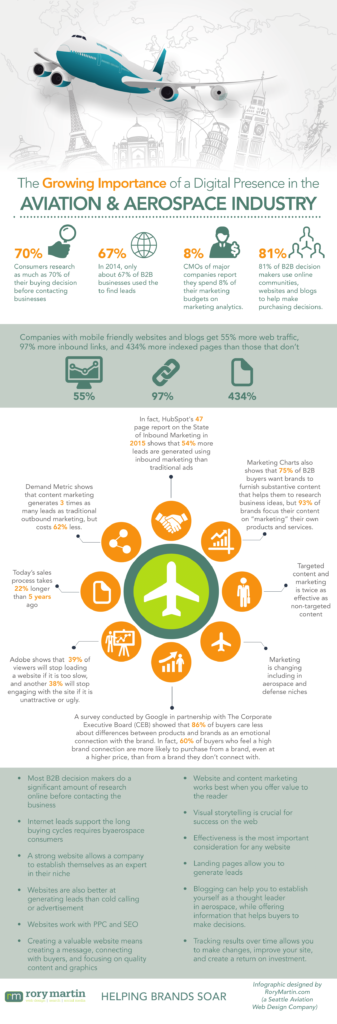
Statistically, the average person researches their way about 70% or more of the way through their purchase decision before contacting a business. In fact, Market Think showed that 81% of B2B decision makers use online communities, websites, and blogs to help make purchasing decisions. Combined with the fact that today’s sales process takes 22% longer thanks to Internet research according to SiriusDecisions, and it’s important that you have a website.
This shift in marketing approach is important for the aerospace industry as well, which has traditionally been offline, relatively secretive, and catering clients with long buying cycles. While the internet is often used to make quick sales, it can provide immense value for longer sales cycles as well. The Internet is well suited to long buying cycles, but also to showcasing brand strength, reputation, credibility, and capability over time, which can be highly beneficial to companies in the aerospace industry who rely on these factors for sales.
Using Website as a Marketing & Lead Generation Tool
Marketing aerospace on the internet requires that you have a strong website to appropriately showcase the brand, capabilities, and quality. A poorly done website says unprofessional in the same way that slapping a brochure together out of an email would have said poor marketing in 2005. A website is the easiest place online to create leads, convert leads into opportunities, and to make sales. In fact, HubSpot’s 47 page report on the State of Inbound Marketing in 2015 shows that 54% more leads are generated using inbound marketing than traditional ads, and Demand Metric shows that content marketing generates 3 times as many leads as traditional marketing, but costs 62% less.
It’s also easy to create leads through natural traffic through SEO (search engine optimization) and PPC (Pay Per Click) marketing, which will allow you to drive visitors to pages that you set up with relevant information.
However, bridging the gap between getting potential customers to a website and converting them into sales is something that takes a quality website, quality marketing, and an understanding of the consumer demographic.
Assessing Company Needs
If you know the audience, then you have some idea of what they want to see. For aerospace, the consumer demographic depends a lot on what you manufacture or design, and how much of it you manufacture or design. But, even the largest consumers like NASA might actually find you through the web.
Consumer demographic or buyer profiles can help you decide on:
- Website style
- Website direction
- User friendliness
- Content style
- Amount of content
- Number of forms
You also want to consider company goals. If the goal is to increase customer database by 500% over the next 5 years, then you need a very strong, interactive website that will get people clicking and sharing. On the other hand, if the company is looking for a modest growth or even maintenance of current sales, you have much less to consider.
Quality company goals should include the information you want to get acrossed, how you want to get it across (do you want gated whitepapers to create leads?), what functions the website needs, which features it needs, and how often you have to update it.
Finally, you have to consider search. If you’re going to optimize a website for SEO, then you have to plan for it. While the aerospace industry isn’t a very high competition market, you still want to be able to come up in search above competitors. This means increasing online presence, integrating a blog, creating texts and whitepapers, and integrating social media, while networking and creating content for peer and industry news sources. And, the website has to support all of that.
Creating Defined Goals and Objectives
If you know what you need, then you can create goals and objectives around those needs. This is important for web design, because it allows you to communicate company or brand needs and the defined objectives directly to the chosen website designer.
- Message – The company brand, voice, value and mission statements, etc. How do you want clients to perceive the business? What do you want say? Who is the company’s ideal client? What are its proof points? How aware of its services are buyers when they first visit the site? How educated in aerospace is the buyer? What are the goals for someone who visits the website? A survey conducted by Google in partnership with The Corporate Executive Board (CEB) showed that 86% of buyers care less about differences between products and brands as an emotional connection with the brand. In fact, 60% of buyers who feel a high brand connection are more likely to purchase from a brand, even at a higher price, than from a brand they don’t connect with.
- What Buyers Want – What is the client’s primary concerns or pain points? How does the company solve their concerns or problems? How does your company do it better than the competition? Research has shown that targeted content and marketing is twice as effective as non-targeted content, so it’s in your best interest to tackle these questions while creating your goals.
Creating Perceived Value – Perceived value is the effect of using high quality media and design to convince the reader that they are looking at a quality website, which should naturally belong to a quality company. Just like you wouldn’t buy a custom bench from a carpenter with a crooked table in his waiting room, most won’t invest in a large aerospace project if the ‘waiting room’ (website) looks shabby. Perceived value is the idea that things that look expensive are expensive, and therefore belong to very successful companies. This means that quality web design, quality graphics and photos, and good UX (user experience) actually create credibility for the website and the brand, even if it is new to aerospace. How important is perceived value? A Harvard Business Review showed that a 1% price optimization towards creating value resulted in an 11.1% increase in operating profit.
Reviewing an Existing Website
If you have an existing website, you can and should go over it. If you don’t, you can consider the following points for the new website.
Visual Storytelling – Visual storytelling is the concept of using graphics, images, and video to tell the brand’s story, even indirectly. It’s important for web design because it backs up text, reduces the amount of necessary text, conveys different ideas and emotions, and can work as a proof of concept or proof or quality for things like design and manufacture. According to the Online Publisher’s Association, 80% of consumers are more responsive to video ads than to text-only websites, 26% looked for more information about the subject of the video, and 46% took some action after viewing the video.
Effectiveness – Whether you have an existing website or not, the new one has to be effective at achieving goals. Your primary considerations should be whether the website ads to marketing efforts, helps you to generate leads, and helps you to create brand awareness. You also want to ensure that it provides education and information for consumers just entering the purchase process. Finally, you want the website to create brand or niche leadership, to show that you are authoritative in its niche in aerospace.
How Visual Design Affects Business
Visual design affects quality and perceived value, which we’ve already discussed, but it also affects a few other things. The first and most important is brand recognition. If someone can visit the site, see the logo, and then go away and not recognize the logo or remember the site, then you’re making a mistake and you’re probably losing customers because of it. Customers should be able to recognize the brand based on something as simple as colors and an airplane logo, you should use the same font, the same colors, and the same style, across the entire website. More importantly, you should know why you chose those things and how they tie into the brand. You also want to take some time here to do competitor research to ensure that the website stands out, so it doesn’t blend in with the competition. Adobe shows that 39% of viewers will stop loading a website if it is too slow, and another 38% will stop engaging with the site if it is unattractive or ugly.
Visual design also affects user experience. A clean, simple design that highlights the company’s primary offerings without offering too much is essential to success on the web. More than 50% of web traffic is on mobile, and number is set to rise, so simplicity is key to making an easy to use visual design. Website graphics affect usability, user experience, professionalism, and communication. In early 2015, LocalVox showed that 49% of sites fail to comply with basic usability principles, and 50% of online sales are lost because visitors can’t find content. You don’t want to make that mistake.
Integrating Changes
Every investment should have some type of return on investment, so you have to know why you’re doing something and what you should get out of it. And, for that reason, many site changes and the new site’s focus, should be based around creating a website that performs well in search, that creates leads, and that is capable of making your company money.
Optimizing for Aerospace Clients – In 2014, only about 67% of B2B businesses used the Internet to find leads. Today, that number is much is right around 84% according to Aberdeen. Consumers look for businesses on LinkedIn and Facebook and then go to their website where they expect to be met with the information, quality assurance, and sales data that will allow them to make a purchase decision. You can meet these expectations with the following items:
- Landing Pages – Landing pages should be easy to read, should tell a story, and should lead the person down the page from start to finish. Most landing pages get people to click by promising something and it is crucial that the landing page delivers on the marketing promise. You also have to convey enough information to interest a potential buyer, offer something of value, and create a call to action with a sign up form to get the reader into the sales funnel.
- Establishing a Blog – Companies that blog get 55% more web traffic, 97% more inbound links, and 434% more indexed pages than those that don’t according to HubSpot. That’s a lot, and it is worth consideration when you’re trying to build your company’s reputation as a thought leader in aerospace, and when you’re trying to draw potential consumers to the site. Marketing Charts also shows that 75% of B2B buyers want brands to furnish substantive content that helps them to research business ideas, but 93% of brands focus their content on “marketing” their own products and services. Therefore, it’s in your best interest to create informative content that helps readers make decisions.
- Launch Whitepapers and Other Brand Leadership – The capability to create whitepapers, reports, and other brand or thought leadership in aerospace will give you the freedom to do so when you’re ready. You should create gated HTML content that requires users to sign up or give you their email for things that offer extra value to readers. If it’s primarily a promotional piece, it should be readily available. What should you include? What information does a consumer need to know when researching the product?
- Search Optimization – SEO is necessary if you want to come up in search and this means optimizing the front and back end of the website, the content, and building the site’s links and reputation. You can start by researching a list of terms that you want the site to come up in search for, and then working to improve ranking for those terms over time.
- Integrating Email Marketing – Email marketing is still one of the most powerful tools available for B2B businesses because it allows you to directly contact consumers who have expressed interest in available services, and offer them what they need. With appropriate targeting, you can actually offer very direct marketing and create a high click-through and return on investment. This means that the site has to support collecting email addresses for a newsletter.
Figuring out marketing goals and working to integrate them into the site is essential if you want to see a return on investment, and that leads us to the next point.
Tracking Results
It doesn’t matter how much you put into a website, you have to track the results and make sure that you’re getting the results you want. If you aren’t, then you have to tweak and adjust the website until you do. The first and most important step is integrating analytics so that you can reliably track visitors, bounce rate, and other data. Google Analytics is a tried and true option, and includes premium and free versions. Is it important? The CMO Survey showed that CMOs of major companies report they spend 8% of their marketing budgets on marketing analytics.
Using Data – Once you’ve started collecting data, you can use it to track individual statistics like which pages users visit, the bounce rate (whether people leave immediately after reading one page), where users visit, exit rates, return visitors, visitor demographics, and many other details. Analytics can help you to track the success of marketing campaigns, help you to track the success of email campaigns, and can help you to track SEO. It also allows you to see which pages perform, which pages get users to sign up to forms, and much more. This data will allow you to make conscious decisions about making changes to the site, tweaking and optimizing, etc. And, this long-term optimization is crucial for ensuring that the website remains profitable.
A great website combines quality design with a value proposition that offers to solve problems for the company’s consumer demographic. It shows visitors that the company is expert in aerospace design or manufacture, that it provides quality, and that its employees are professional. A great website also allows you to collect leads, post content and to show that the company is a leader in the industry. And, while that’s a lot for one website, it’s necessary if you want to stand out in the aerospace niche.
If you want to know more about what goes into a website, contact Rory Martin, specialists in aerospace web design, for more information, a free quote, or for a look at some of our previous work.

How to Plan Your New Year’s Website With Your Web Development Team
Posted by Rory Martin in Web Design and Development on December 22, 2015
The New Year is fast approaching, and in Seattle, that often means businesses get productive by starting plans for the new year, and often, redesigning or launching their online websites. If you’re planning a new website, then you need a web development team, and hopefully a local one based right in Seattle. However, you still need plans of your own, and here’s how to get started.

How to Get Started: Creating Ideas
If you’ve already found a local Seattle web development team to get started with, they will likely help you off with a kickoff meeting. However, you should have a list of ideas, wants, needs, and preferences when you go in. Much like if you were building an extension on your house or having a company renovate your kitchen, your web design team has to know what you want, why you want it, and what features you need. If they’re developing blind, they likely won’t even come close to what you need. A good start is finding websites that have a similar look and feel to what you want, writing down a list of features, why you need those features, a timeline (when you have to launch), color palette, business branding, and preferred style. You can use this information to get a quote, so you can find and choose a great local web developer.
For the Web Developers: Needs Assessment
At the same time, your web developers should be performing a needs assessment on your business. They will likely ask you questions, check your business, and decide what you need. This should involve demographic assessment, competitor overview, product and size assessment, and a search optimization assessment if your website is currently online and they also handle SEO.
The Kickstart Meeting
Once you both have notes, you’ll both get together (in person if you have a local Seattle team) and discuss your ideas, exchange notes, create new ideas, and look at concepts or themes. Most of the time the web developers will go over your preferred features and discuss them with you, decide which ones you really need, and point out if you missed anything. You’ll discuss style, and choose a website that works well with your user demographic, your business branding and style, and your personal preference.
Here, you will make most of the final decisions on ideas, but there are still a few more steps. Once you’ve approved the initial planning, you’ll still have to go through and approve mockups and wireframes for your site before they’re brought to life. You may also have to chose hosting, security features, and items like whether or not you want a blog or a comment system.
From there, all you have to do is wait to see your website for approval.
Why Is It important to Plan?
Taking the time to create a plan, strategize when and where you want to launch, and deciding on exact features and styles in advance can seem like a headache, but it will save you a lot of time and hassle in the future. It also makes the web developers job easier, as they won’t have to guess what you want or when you want it.
Are you planning to launch a new website or website redesign in 2016? Contact Rory Martin, a local Seattle web development team, for a quote, and we’ll get you started with your planning.
The 10 Web Design Trends You Need to Know for 2016 – Seattle Web Design
Posted by Rory Martin in Web Design and Development on December 16, 2015
Building a website, or hiring a Seattle web design team to do it for you, requires a lot of work, but more importantly, it requires a lot of important design decisions. Choosing what you want partially involves making decisions based on your brand and partially involves choosing what your customers expect and want to see. These top 10 web design trends include some of the best and most recent website technology that you can use to make your website look modern, appealing and easy to use.

1. Minimalism
Minimalistic websites are extremely popular for a number of reasons. While many people suggest that multi-page websites do best in search, they can be complicated and difficult to navigate for your readers. Taking a minimalistic approach, cutting out everything that you don’t need, and including more blank space than menus and headers, will ensure that the reader gets a great experience. If you need more pages for search, you can always install a blog.
2. Responsive Design
Mobile is here to stay, and in fact, it’s surpassed desktops in search volume. Unfortunately, mobile doesn’t come in just one screen size, so responsive design is here to stay. You want to optimize your site for slow internet on mobile devices, multiple screen sizes, and short attention spans.
3. UX/UI
Planning your user experience and user interface is something we should have been doing all along. It’s important that your Seattle web design team takes UX into consideration when designing your site.
4. Hidden Menus & Hamburger Menus
Hidden menus and hamburger menus get a lot of criticism, but they’re here to stay. They also help to prevent a cluttered mobile page because the menu is tucked neatly out of site. THey’re also common enough that almost everyone know what they are.
5. Large Images
Big Hero images and image backgrounds are extremely popular, but they have to be high resolution to extremely high resolution, and mainly monochromatic. Using an image as your background, or for most of the page, captures attention and keeps it, and is better than using a small banner.
6. Ad blocking
Ad blocking may not be a web design trend, but with 144 million ad blocker users, it’s here to stay. That means web designers have to create sites around users who could be blocking ads, which can be difficult for sites that make money off of advertisements.
7. UI Patterns
UI patterns are increasingly popular, because they allow you to create an entire user interface using an existing pattern, which makes it easier for consumers to use, and easier for the designer. Most importantly, each one can be tweaked and adjusted to create something completely unique, which is better for your business recognition.
8. Rich Animation
Rich animation, such as animations and illustrations, moving buttons, and animated anything on the website are back in style, and they haven’t been as popular as they are now since the days of Flash in 2012. They take a little bit more work, and they aren’t always a good idea (I.e. if a large portion of your traffic is mobile), but they can be exciting, fun, and unique.
9. Web Design Layouts
Long Scroll – Long scroll websites allow you to tell your entire story on a single page, and you can replicate the appearance of a multi-page website by dividing content into sections. This is also great for mobile users. If you’re worried about people not scrolling, don’t. It’s been proven that the trend of not scrolling below the fold is over thanks to mobile users having to scroll anyway.
Card – Card designs break the website up into smaller portions, which are easier for readers to digest, and can be rearranged to your preference on smaller screens.
Dynamic Grid – Think Pinterest. These sites are perfect for shops and anyone that relies on images or video, and work extremely well on mobile devices.
10. Video
From video headers to profile images to video backgrounds, video is becoming a huge trend in web design, and is set to keep growing for 2016. Like animation, you should be cautious with using it if most of your users are on mobile, but it can be powerful, creative, and interesting.
Web design trends are essentially what’s hip in the world of web design. If you want to know more, or get a quote on your website, contact Rory Martin, a Seattle web design company.
Improving Your Website Security – Seattle Web Development Tips
Posted by Rory Martin in Web Design and Development on November 24, 2015
Whether you’re using a CMS like WordPress or Joomla, or have a custom design, security is a huge issue that affects every site on the web. With thousands of websites hacked every day, using strong security is essential for your site, your investment, and your customers. Not only do hackers mess up the work your web designers put into the site (that you paid for) they can also redirect your clients and customers to pages where you don’t want them to go, infect their computers with viruses and malware, and steal their information. If you want to protect yourself and your reputation, you have to take steps to secure your website.

Make Site Backups
Site backups won’t protect your site, but they do allow you to cancel everything and immediately re-upload to your last working site if someone hacks it. If that happens, you will have to immediately change all of your passwords and add security, but it does allow you to get everything up and working again without losing money if your site is hacked.
Limit the Number of Failed Connections/Entries
You can limit the number of times that someone can attempt to log in before they are locked out. This is essential for blocking hacking bots, which input lets and numbers and words randomly until they gain access. Usually, 3 to 5 times is enough, after which you can require administrator assistance.
Change Your Login URLs
If you’re using ‘administrator’ or ‘login’ or ‘wp-admin’ to access your login, then you’re making a mistake. Change the database to change the URL. Your Seattle web development team can do this for you. What should you change it to? Make it unique, something you can remember, and short.
Use Stronger Passwords
If you’re using Password 123, or another similar, easy to guess password, you should try again. Don’t use anything related to your name, your business, signing in to an account, or your password. Try a password generator, or use an 8-15-digit password with lower case and upper case letters, numbers, and punctuation or special characters.
Be Careful
If you’re downloading and using free skins or site themes, they could include base64 encoding, which could allow hackers to distribute malware to your site. Only use themes from trusted sources.
Use HTTP Encryption
It is important that you use encryption on any pages where customers check out, pay for something, or input personal data. This is important to ensure that their data is not stolen, because you will be liable. If you store their personal data, you have to encrypt that as well. Put your security measures in your privacy policy document so visitors can check it. You can purchase a security certificate from a number of providers to set up HTTPS encryption.
Securing your website is important for your business and your reputation, so make sure you take the steps to protect it. Hiring a professional Seattle web developer to help you with making your site secure is a good step if you aren’t sure how to go about the technical aspects of security.
Do you want to know more about website security or features? Contact Rory Martin for more information.
Should You Use a Web Designer or Go with a Template or Builder? Seattle Web Design Questions
Posted by Rory Martin in Web Design and Development on November 17, 2015
Setting up a website for the first time can be tricky, especially if you’re trying to do it on your own. One of the biggest questions we get about Seattle web design is whether it’s okay to use a template or website builder or if you need a web designer. This question is difficult to answer, because the truth is it depends on the business in question. The following information should help you decide.
Website Builders and Templates or Themes
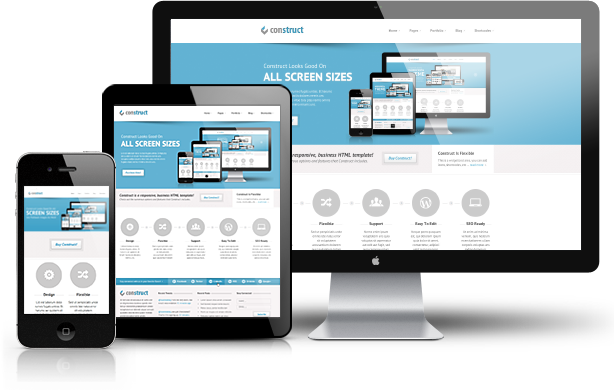
Website builders, themes, and templates are usually free or low cost (a quality theme will cost as around $40-$65 or $500+ if you want to buy all of the rights), or cost a monthly fee, which may or may not include hosting. While this might seem like a cheap and easy way to get started, it often isn’t, because there’s a lot more involved. When you hire a Seattle web designer to create your site for you, they will handle everything, including setting up hosting. If you’re using a paid website builder, it is as easy as it sounds, but you’ll still have to drag and drop, and work with the layout to try to create something professional. Some of the tasks that a design and development company will handle included:
- Purchasing your domain name (Costs money)
- Setting up hosting (monthly fee)
- Installing a CMS
- Installing the theme, skin, template, etc.
If you’re doing it yourself, you’ll end up doing all of that yourself, some of which can be quite complex and time consuming. If you’re tech savvy, you can probably handle it okay, but many people end up paying for professional help just for setup, which can be almost as expensive as paying a designer to do it for you in the first place.
Website Design
Whether you’re using an existing CMS like Joomla or want your own CMS, a website designer can and will create a custom design for you based around your business needs. Costs usually run in the mid to high triple digits and can run into four digits but do include items like hosting, domain names, maintenance, installation, and setup. Many web designers set fees based on how many hours they take to complete the project, and setting up a website with an existing theme can run from 5-20 hours, and designing a new theme can run from 50 to over 150 hours depending on the complexity and style of the site.
You get:
- Everything done for you
- A unique website that performs well in search and exactly meets your needs
- A branded website
- Scalability, responsiveness, and local optimization
Which Option Should You Chose?
Choosing between web design and templates usually comes down to one thing. Money. If your business can afford to pay for a website designer to create a custom site for you, then do it. It’s well worth the money in terms of having a unique site that no one else has, having the branding, and saving time on installing and updating the website yourself. In some cases, you can pay a designer to set up a theme with custom graphics to save money if you don’t know how to set up a website yourself. If you don’t have any money or budget for digital marketing, then you can use a pre-built theme or skin while you save up, and plan to make something worthwhile.
Want to know more about how a custom website can help your business online? Contact Rory Martin for more information
Website Navigation Tips for Businesses – Seattle Web Development
Posted by Rory Martin in Web Design and Development on October 27, 2015
Your website navigation is one of the most important aspects of your site, because it controls how people get from one place to another, and can make or break sales, creating leads, and even reading more on your site. While it can be tempting to simply cram everything into your menus so that people can find it, they often find nothing at all. If you’re working with a Seattle web developer, or planning to hire one, these following tips will help you with making the right decisions regarding your menus and other website navigation.

Use a Recognizable Style
It may be tempting to use a unique menu or navigation system because it makes you stand out, but the important thing to remember is that people will have to learn it. When helping people through your site, especially to making a purchase, the last thing you want them to have to do is take a moment to learn. Studies and real world reactions show that people hate things they aren’t familiar with. Use existing menu systems and layouts that people already know, understand, and can use without a second thought.
Ditch Drop Down and Sub Menus
Drop down menus and sub menus may seem like a good idea because they allow you to clean up your home page, but they aren’t usually a good idea. You want to make it as easy as possible for people to see where they have to go, which means using a menu that they can see. Hamburger menus are popular, but not always a good idea because they make finding the menu difficult, especially on small screens.
Optimize Your Navigation Order
If your navigation order is completely randomized, then you are doing it wrong. You want to figure out which pages people are most likely to visit, and in what order, and organize based on priority. You don’t really want an irrelevant page on the top of the menu, because it completely throws the menu off and makes it that much harder to use. If you’re upgrading an existing website, you can usually go about upgrading your menu by prioritizing the pages that get the most traffic, or using the path that most people take through your website. If you’re building a new website, you can ask your Seattle web developers to create a natural path through the website for users to follow, and organize navigation accordingly.
Use Links Not Buttons
Links are better for menus than buttons because they’re smaller, simpler, less likely to malfunction, and are better for search optimization.
Keep it Simple
Simplicity is the key to a good menu. Don’t make it hard to find the right things, don’t add too many items, and certainly don’t have more than 10 items. Sub-menus may seem like a good idea but they are most often messy, difficult to use, and can fail completely on mobile devices.
Good navigation makes for a good user experience, which boosts your SEO, your website’s usability, and your conversion. Discuss it with your local Seattle web development team during site development, and make sure that it’s easy to use before you launch.
Elements of Modern Web Design for Seattle Businesses
Posted by Rory Martin in Web Design and Development on October 20, 2015
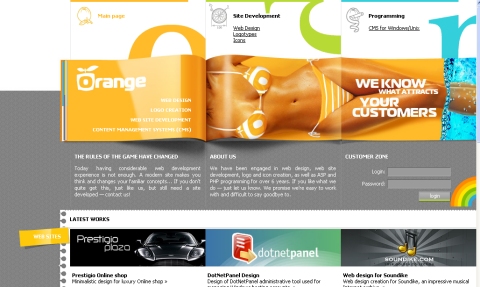
Modern web design has come a long way from the early days of the Internet. Where once flashy banners, automated code, and literal digital neon signs were the hallmark of an expensive website, today’s sites are considerably more sophisticated, relying on wide open spaces, large text, unique fonts, and simple graphics to catch the eye. Minimalism is definitely in, and users will thank the designers who follow trends for focusing on experience rather than appearance. If you’re hiring a Seattle web designer, you should consider many of the elements of modern web design, and try to implement the best of it into your own design (but don’t copy).
Unique Fonts
Font or typography is one of the easiest ways to ensure that readers remember you, simply because you stand out more. While the choice is up to you when choosing between a serif and sans serif font, you should choose something that is large, easy to read, and that you can read when standing about 10 feet back from your computer for headlines and banner text. Fonts also tell readers who you are, because a font can be fun, serious, stylish, formal, and so on.
Large Media
Images and photos are both incredibly useful for web design because they improve visual appeal, and video can be used to increase time on page, decrease your exit rate, and improve your bounce rate, which all help with your marketing. If your images are of products, you also want them to be responsive, so that you can click, zoom, and take a closer look at what you’re doing.
Responsive
If the modern web could have a calling card, it would be either responsive or mobile optimized. You need mobile optimization, or a website that resizes itself for mobile users. Creating different versions of your site for different types of web browsers (iPhone, Android, tablet) is essential for continued success on the web, especially as more and more users move away from the desktop and laptop, towards primarily only accessing the web via mobile devices.
Better Menus
The days of long overly complicated menus with sub menus are over. If you have to click more than three times, or hover your mouse at just the right angle to get a sub menu, and a sub menu from that, you’re doing it wrong. Hidden or hamburger menus are also popular, because they stay out of sight, which improves the visual appeal of the website.
Flat Design
Flat web design has become a definite trend since Apple adopted it for their website, and for good reason. With little to distract the reader, and only small allusions to depth, it’s simple, minimalistic, and directs the reader where you want them to go, instead of wasting valuable time trying to impress the reader with your web design team’s skills. Flat and semi-flat design are both great options.
No matter what you’re considering for your website, you should have a discussion, or a free consultation, with your local Seattle web design team before you start planning. Choosing items based on your budget, your business needs, and the design team capabilities is important if you ever want to see your plans brought to life.
Want to know more? Contact Rory Martin for more information.
Things to Keep in Mind When Redesigning Your Website – Seattle Web Development
Posted by Rory Martin in Web Design and Development on September 22, 2015
Building a website and standing out in the busy Internet traffic that makes up much of Seattle’s modern commerce can be tough, especially if you’re a small business. Redesigning it can be even more of a hassle, especially if you’re not entirely sure what you want, or why your first design didn’t work. The following considerations should help you out with what to keep in mind, what to ask your Seattle web development team about, and what to consider during the process.

Who’s Doing the Research?
Depending on your web development team, research and planning may be up to you, or up to them. You usually want them to handle it, because unlike you, they are professionals. Market research, keyword research, continuity mapping, demographics, brand image. You have to know everything, and hopefully before you plan your website.
Backend SEO
If you’re doing a redesign, then now is the perfect time to handle your backend SEO. Everything from your site structure to your URL’s affects your SEO. Talk with your web developer about items like website structure, and research to see what the normal route through your website is (pages people visit). You also want responsive or adaptive design.
If you decide you need a mobile site, then you have to make sure you have canonical URLs, which also have to be set up. Redirects and canonical URL’s are something that will help with your SEO, because it ensures that even if you have a mobile website and a normal website, search engines see visitors from both as on the same page. It also reduces the risk of being flagged for duplicate content. Speed, page load times, 508 and W3C compliance, and if you have an international website, EU Cookie Law, all have to be considered as well.
Navigation
Too many websites are unnecessarily complicated, making it difficult for users to get around. If you’re trying to sell something, whether that be products or a pitch to visit your brick and mortar business, poor navigation can be detrimental to your pitch. If people can’t find what they need in 30 seconds or less, they will usually leave your site. You want to make navigation and menus as simple and as easy as possible to use.
Content
Content is the backbone of the web, so it’s important to consider it when creating your website. Considerations include photo size, how much web content you want per page, whether or not you’re publishing a blog, and other types of media such as whitepapers, video, eBooks, and for-purchase content. All of these considerations are important to keep in mind when designing your website because the website usually has to be designed around them.
Testing
You wouldn’t create a recipe and make it for guests without ever once trying it, so try not to do it with your website. You want to hire a web developer that handles testing, or allows you to come up with a testing team for quality assurance. This is especially important if you’re promoting your website launch to your regular customers, so that you know everything works. You also want feedback before you launch, so you can make changes to perfect your site.
There are a lot of things to keep in mind before you redesign your website, but if you have a good developer, you should be able to get most or all of it from them. Contact Rory Martin to learn more, or to discuss your website needs.
Responsive Web Design vs. a Mobile App – Seattle Web Developers Discuss
Posted by Rory Martin in Web Design and Development on September 15, 2015
Mobile is becoming more and more important as users switch from clunky laptops and desktop PC’s to their lightweight, mobile tablets and phones. While many homes still incorporate a PC, more than 27% of the population no longer owns a computer, and instead relies almost solely on their mobile device to access the web and all that comes with it. With some 54% of millennials admitting to using mobile to compare rates and shop when in physical stores, mobile access can make or break a sale.
But, you get it, you need mobile. We don’t have to convince you of that. What you do have to consider is whether you need a mobile app or a responsive web design. This decision is a bit more complicated, because it requires understanding your complex market and user database.
What’s the Difference between an App and Responsive Web Design?

One of the most frequent questions we get about web design is ‘what’s the difference?’. In simple terms, a responsive web design allows your website to automatically resize based on the browser and screen size of the visitor. It can be accessed via any browser, so long as the user has Internet. A mobile app must be downloaded from the app store.
Pros and Cons of a Mobile App
A mobile app is a great way to engage with consumers and tell them that they are important enough to you that you made them an app. If used properly, you can offer a webshop, sales, discounts, consumer rewards programs like points, notifications, and much more through an app. Apps are fast, capable of more functionality than websites, and can incorporate smartphone features (like GPS to offer real time directions to your store). They’re also popular, in 2014, consumers spent 27% of their time with mobile brands using apps. If you’re trying to boost your search ranking, another consideration is that app pages do not show up in search. While versatile, easy to use, and relatively inexpensive to deploy, they have one major flaw. The consumer has to be committed enough to your business that they are willing to download an app to clog up their probably already full mobile phone with your app. Unless you are one of their favorite stores or restaurants, you probably won’t be able to earn this kind of commitment.
Pros of Responsive Web Design
Responsive design is easy to integrate into almost any website, boosts your search engine optimization, and allows any casual visitor to quickly come along and check out your website. This makes responsive web design convenient, relatively easy to deploy, and easy for anyone to use. While it’s not going to push as many sales as an app, it does allow new customers to research your products, check your website from their mobile device, and get in and out quickly without being annoyed by a desktop layout website. Responsive design is not a cure-all, and it will require maintenance, but it’s a much more versatile solution than a mobile app.
Which Is Right For You?
For most small businesses with no strong consumer base, the answer is definitely responsive web design. However, for almost everyone else, the answer is both. Responsive web design allows casual visitors to easily check out your website and your products, price or quality compare, and then go back to whatever they were doing. An app requires a lot more commitment, which most new customers just aren’t willing to make. Of course, your long-term customers who shop with you regularly are almost sure to appreciate an app, especially if you use it to offer updates, sales, notifications of deals, and even special user discounts. Responsive web design is pretty much a must-have for everyone, so even if you have an app, you should consider responsive design. If you can’t afford both, focus on the web design first, and budget for the app later.
Want more local Seattle web design tips? Follow our blog. Or, contact Rory Martin for a quote on responsive design for your business.
Planning Your Small Business Website For Your Budget – Seattle Web Development Tips
Posted by Rory Martin in Web Design and Development on August 25, 2015
In an ideal world, everyone could get the exact website they wanted, and even a small business website could have custom coding, a unique content management system, built in functions and features including a webshop, contact, or menus, but the truth is, not everyone can afford it. Most Seattle small businesses have a tight budget, which means choosing your features and functions wisely, cutting corners where necessary, and planning for the best results. This does require planning, and a careful discussion with the Seattle web developer you choose, but it does mean that you can get a fully functional website within, or close to, your budget.
- Cool quote posted by my friend Erin Shafkind
 Decide What You Need
Sitting down to discuss your website needs, wants, and options, and then narrowing them down can help you with keeping costs to a minimum. An easy example is deciding if you need menus, a webshop, or etc., and then discussing the pros and cons of each. If you have a webshop, you won’t necessarily make sales off of it, so it might be a better fit to add to your website later. Planning your features and deciding which you need now and which you can add on later can save you money, but it’s also important to ensure that you’re only getting the features you absolutely need.
Consider Existing Designs
If you want to save money, then considering a pre-built website theme with custom design and custom layout could be the way to go. In fact, this is the best option for many small businesses, because it can cut hundreds of hours of developer work off of your bill. While a custom design will still give your website the best chance of standing out, it’s not 100% necessary, especially if you’re aiming at a small local audience of people who live in the Seattle, or your suburb, area. For example, if you choose to go with a Joomla website, you can save a lot of time developing a custom backend to your site, and still get a completely unique design.
Plan For the Longest Launch Time Possible
One consideration is that if you need rushed work, you will usually be charged for it. Ask your developer what a reasonable time to launch is, and then go with that rather than trying to get your website up by a specific time. This also ensures that developers have the time they need to do everything correctly, so that your website is as functional as possible.
Combine Extra Services
Some Seattle web development companies have services for promoting your website, integrating your digital marketing or social media, and so on. These might seem like added expenses, but chances are, if you’re launching on the web,, you need them. Consider comparing costs with hiring someone separately to see how much you will save, and then plan those costs into your budget. After all, your website won’t make a return on profit if you aren’t marketing it properly.
Hiring a Seattle web development team to build your website can be challenging, but don’t go into it without asking questions. Ask for quotes, get information, and make sure you know everything before you make the hire to ensure that you know what you’re getting into. You can start by requesting more information from us here.
Recent Comments