Posts Tagged search engine optimization strategy

HOW TO: Build Your Personal Brand on YouTube

  • Dan Schawbel is the bestselling author of Me 2.0 and owner of the award winning Personal Branding Blog. His latest blog, the Student Branding Blog, provides branding and career advice for high school, college and graduate students.

    There are thousands of different websites that you can leverage to build your own personal brand, but only a few that will give you both the reach and credibility to make a major impact. Here at Mashable (Mashable), we’ve provided you with a detailed look at how you can build your personal brand on Facebook (Facebook), Twitter (Twitter), and LinkedIn (LinkedIn).  Today, we’ll focus in on the largest video sharing site on the planet, more commonly referred to as YouTube (YouTube).

    With over 120 million U.S. viewers, YouTube is used by President Obama for his weekly State of the Union Address, by universitcies who share lectures from star academics, and by celebrities such as Miley Cyrus who use it as a lifestream. Aside from the popularity of YouTube, the site exploits the most powerful branding medium of them all, video.

    The reason why video is so effective in communicating your personal brand is because your audience will already feel like they’ve met you by the time the video is over.  With video, you get a sense of who someone really is based on their voice, their face and their body motions.  Video (video) can support your branding efforts like no other medium on the web.


    1. Brand your profile


    In order to build your personal brand on YouTube, you have to decide how you want to position yourself.  If you already have a brand (such as “financial expert for baby boomers”), then carry it over onto your YouTube channel to make it consistent with your other web properties.  Channels that have multiple faces should be branded under a topic or a company.  Channels that only have one face and voice should be branded under a full name.  This is extremely important to understand because you can’t change your channel name at a later date. 

    keithferrazzi youtube image

    Choose a channel name: Depending on your branding strategy, you could choose your full name, your company’s name or a unique “show” name for your YouTube channel.  For instance, if you want to brand yourself as an expert in your field, you might want to do it under your own name.  The URL you will receive in return for a successful registration on YouTube is youtube.com/user/yourfullname.

    Profile setup: Just like with Twitter, LinkedIn and Facebook, filling out your profile is important because it will allow people to locate you on a platform where millions of people are competing for attention.  You are able to upload an avatar or use a screenshot that they give you from your latest video.  Use the avatar/professional picture that you have everywhere else.  You also get to add a single URL, which should be the website that best represents you as a brand, such as your blog or LinkedIn profile.

    Channel information: Most people don’t know that there are different types of accounts you can choose on YouTube.  If you’re an expert in your field, then I recommend selecting the “Guru” account type because you can use a custom logo and add links.  To access this page go here.

    Customize your channel: Log into your account and view your channel as it currently stands.  On the top right of your screen, select “Switch to Player Mode.”  This will change your current display to the newer layout, where people can view your latest video and select any other ones that they want to watch from the sidebar.

    Channel title and tags: Where it says “Edit Channel,” you should click on “settings” and then give your channel a title, such as “Mike Smith’s Internet Marketing Show.”  On the right, you’ll want to type in tags that reflect your video content, such as “marketing” and “mike smith” because that’s how people will find your material while searching.

    Themes and Colors: Under “Themes and Colors,” find the colors and overall look that align with your website, blog, business card, PowerPoints, etc.  You can also upload your own background image and change fonts and colors.  There are websites that have free YouTube designs that you can use too.

    Modules: Now you want to go to “Modules” and check all options because comments, recent activity, and friends are all important if you want to build a community around your YouTube brand.

    Latest video: The last thing you want to do is to click on “Edit” on the top right of the screen and where it says “Featured Video,” select “Use the Most Recent.”  This way people will be viewing your latest video automatically.

    Now that have presented your audience or future audience with a legitimate profile and design on YouTube, you’re ready to start developing videos that will put your brand in the spotlight, while helping you build your business.


    2. Create remarkable videos


    Content is king and on YouTube, the only true way to be successful is to have content that is worth spreading.  Typically, this means it has to be either really funny or extremely interesting.  Here are a few examples of remarkable content. Video isn’t for everyone and you shouldn’t fool yourself if you know you’re introverted and shy. 

    Video equipment: I recommend either using a web camera from Logitech (Logitech Z523) ($99) or a Flip Ultra HD ($200).  The flip is higher quality, but the webcam allows you to do video chat or live video in addition to regular videos for YouTube.

    Advanced video equipment: If you’re really serious about creating a video show on YouTube, then you may want to invest in a sounds system, amplifier, lighting, and other professional tools that will make it look professional.

    Produce content: The best part about taking videos of yourself is that if you don’t like the end product, you can delete it very easily.  I recommend that you shoot multiple videos at once and then cut the ones that don’t work well.  Make sure all of your videos fall under the theme of your YouTube channel and that you fill out the title, description and tags for each.  In the description of each of your videos, there should be a link back to your blog or website because the people that watch your video might have never heard of your brand before.

    Once you have about five or six videos, you will want to start promoting both your channel and each video to your audience.


    3. Promote your videos


    When promoting your channel and your videos, you’ll want to use the network that you already have before you start to get creative.  In the past year, YouTube has streamlined the sharing process through various social networks. 

    obama youtube image

    Facebook Application: Using the YouTube Video Box Application on Facebook, you can add your videos automatically on your profile page or your Facebook Fan Page.  This is a great way to give each of your videos additional visibility without additional labor.

    Autoshare on Facebook, Twitter and Google Reader (Google Reader): Go to your YouTube account settings and click on “Sharing.”  In this menu, you can automatically syndicate your YouTube updates (such as when you upload a new video) through Facebook, Twitter and Google Reader.  Before you check all three off, please understand who your audience is on each social network.  For example, if you share your professional videos on Facebook, where only your college friends are, then it might be awkward.

    Add your blog: Go back under YouTube account setting and click on “Blog Setup.”  This will allow you to link your blog (WordPress (WordPress).com/org, TypePad (TypePad), Blogger (blogger), etc) with your account.  This feature will enable you to post your videos on your blog directly in just a few simple clicks.

    Embed your videos: If you have a blog or traditional website (corporate or personal), you can embed one or more videos from YouTube on it.  YouTube embedded videos give you options, such as a border, different size arrangements and a variety of colors.

    Link to your channel or videos everywhere you can: The more links you have to a video, the higher it will rank when keywords are searching in YouTube or in Google (Google).  Also, more links typically means more traffic to your videos, which helps build your brand.  Link to your channel and videos from your resume, from your social networking profiles (possibly as a graphic icon), from your email signature, from your presentations and everywhere else.

    YouTube isn’t going anywhere.  It’s one of the most trafficked websites in the world and it’s a great place to get started with online video.  Even though many of your videos might not get 100,000 views, the important thing is that you can leverage that video content and share it on all of your branded properties.  Your YouTube channel can become a very important asset to your brand, one that provides your authentic voice and appearance like nothing else can.

Share

, , , , , , , , , , , , , , , , , , , , , , , , , , ,

No Comments

Making Social Media a Tool, Not a Distraction

Making Social Media a Tool, Not a Distraction

It’s becoming clearer and clearer that social media can be an incredible tool for everything from enterprise research to customer service. And as many companies are finding out, social media can help improve your bottom line too.

However, there is a flip side, especially for employees sitting in front of computers at their desks or cubicles: it can also become a distraction. For some entrepreneurs, it’s tough to see how interrupting coding sessions with tweets or browsing the Facebook News Feed can be productive to business.

The reality of the situation though is that social media is just like any other tool: it can make a major impact in the right situations, and it can do harm as a time sink. Therefore, your goal should not be to discard social media, but to figure out how to make it a powerful tool, rather than a useless distraction.

Making a Plan, Setting Goals, and Executing

The key to making social media a useful tool is to have a specific plan and a goal for how you want to use it. Many small companies don’t enter the social media realm with a plan, but instead expect tweets and YouTube videos to equate to more traffic and more sales. That just isn’t how social media works.

Instead, understand your needs. Do you need more traffic to your website, or are you looking for more brand awareness? Do you want to prevent bad press before it happens, or are you more interested in creating a community that will generate good press? Always pick your goal first.

Once you have a goal, set a plan, just like you would for any other business objective. Make sure you set up metrics to measure success and implement tools that will help you measure ROI. That means tracking clicks with a tool like bit.ly or checking your Facebook Page’s analytics every week.

Finally, just execute. Don’t be afraid to reach out, make mistakes, and be vulnerable. Even if you make a mistake, customers will forgive you if you’re transparent. Just ask Facebook, which has made many blunders, but has overcome them and continues to grow.

Tips for Avoiding Social Media as a Distraction

Social media doesn’t have to be a distraction, but you should adhere to some rules to avoid it becoming a time sink:

-When you need to concentrate on an intensive task like coding or writing, close up the social media tabs and apps (and email if you can).

-Many times employees turn to social media when they’re bored, so constantly give them work that challenges and inspires them.

-Have a clearly defined social media policy so employees aren’t left wondering what’s acceptable and what is not. Here are some tips on building a social media policy.

-Prioritize. Sometimes social media outreach has to take a backseat to more pressing needs. know when that occurs.


Original Article
Image courtesy of iStockphoto, Madmaxer

Share

, , , , , , , , , , , , , , , , , , , , ,

No Comments

The Synergy of Search and Social Media – from Emarketer.com

The Synergy of Search and Social Media


OCTOBER 15, 2009

Two is better than one

Research has shown that display ad exposure can lift consumer response to paid search. Data from comScore, GroupM and M80 indicates searchers are also more likely to keep a brand in mind if they have seen a combination of paid search ads and social media.

The research firms found a 19-percentage-point lift in searches on the campaign brand among users who saw social media relevant to the brand in addition to the campaign’s paid search ads compared with those who were exposed only to the search placements. And there was a further 13-point lift among those exposed to social media influenced directly by the brand.

US Internet Users Who Search on Campaign Brand Terms, by Ad Exposure, 2009 (% of total)

“Every day consumers express their intent via search. Now, we better understand how that intent is established via social media and the interplay between the channels,” said Chris Copeland, CEO of GroupM Search—The Americas, in a statement.

As a Seattle Web Design company that specializes in Seattle Search Engine Optimization and Seattle Social Media Marketing, we recommend using paid ad search and social media as described in this article from http://www.emarketer.com. We do…and will do it for you. 

The effect was even more pronounced when it came to searches for product terms rather than brand terms. Users were almost three times as likely to search after seeing influenced social media plus paid search, compared with paid search ads alone.

US Internet Users Who Search on Brand Product Terms, by Ad Exposure, 2009 (% of total)

Consumers exposed to paid search along with influenced social media also had a 50% increase in click-through rate on paid search ads. Organic search click-through rates were higher, too.

“This finding provides strong evidence that investing in social media marketing can both increase initial brand consideration and drive higher conversion rates once the consumer has decided to purchase,” said Graham Mudd, vice president of comScore.

As a Seattle Web Design company that specializes in Seattle Search Engine Optimization and Seattle Social Media Marketing,we are committed to posting better and better posts that help you and your peers use great online tools..for more information please visit our site at RoryMartin.com

Share

, , , , , , , , , , , , , , , , , , , , , ,

No Comments

Conenza stands to lead the way in 2010 for social networking platforms

conenza
White-labeled alumni networking platform
Conenza builds and manages collaborative online communities for multi-billion dollar organizations and their alumni. Key features of the Conenza alumni community platform include: searchable, self-maintaining alumni directory; core community services including news, networking, events, jobs and resumes, & marketplace; compliance with corporate privacy policies, secure platform administration, content management, and reporting tools.
Share

, , , , , , , , , , , , , , , , , , , , , , ,

No Comments

RoryMartin.com new site is live – Please stop by and check out the portfolio

I am excited to launch the new site. We used Joomla, Yootheme, as well as a few other plugins for social media tools.

If you haven’t seen it please check it out: RoryMartin.com

Next month we launch SeattleSocialMediaMarketing.com and LegalSocialMediaMarketing.com

New site landing page for RoryMartin.com

Share

, , , , , , , , , , , , , , , , , , , , ,

No Comments

Social Media Revolution Video from Socialnomics – Seattle – RoryMartin.com

As a Seattle Web Design company that specializes in Seattle Search Engine Optimization and Seattle Social Media Marketing, we recommend using searching more and more on Socialnomics type information to help you stay up to speed onwhat’s happening. We do…and will do it for you. This video can be found at: http://socialnomics.net/video

As a Seattle Web Design company that specializes in Seattle Search Engine Optimization and Seattle Social Media Marketing,we are committed to posting better and better posts that help you and your peers use great online tools..for more information please visit our site at RoryMartin.com

Share

, , , , , , , , , , , , , , , , , , , , , , ,

No Comments

What Exactly Do 1.6 Billion Retweet Buttons Get You? About 6 Million Actual Retweets.

As a Seattle Web Design company that specializes in Seattle Search Engine Optimization and Seattle Social Media Marketing, we recommend using reading Techcrunch.com to stay up to date with what’s going in in technology. I read it and almost every day say to myself…man I’m glad we have it.

Original source link from Techcrunch.com

If you look at the top right hand corner of any blog post on TechCrunch, you will see both the number of comments on it and the number of times it’s been retweeted (linked to and passed around on Twitter). Usually the retweet number is bigger than the number of comments because it is much easier to do. It counts as a vote for that post inasmuch as a passed link can be construed as a reader recommendation. Everyone who retweets a link is in effect recommending it to all of their followers, and it can help to drive traffic back to the original post. At least that is the theory.

tweetmeme-retweet-graph

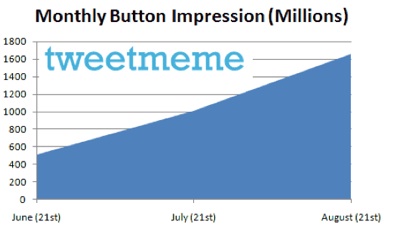
But how many retweet buttons are actually out there and how many people click on them? When it comes to the spread of the buttons themselves, TweetMeme offered some stats today showing that its retweet buttons are now getting 1.6 billion impressions a month. That number has quadrupled in the past two months alone. New retweet market entrants have a lot of catching up to do. And Just wait until retweet buttons start appearing on individual comments as well.

What that means, however, is just that the buttons are appearing on blog posts and articles which collectively are viewed 1.6 billion times a month, not that they are clicked on that many times. I asked Tweetmeme founder Nick Halstead how many actual retweets do those buttons produce. He doesn’t have exact numbers for that yet, but his best guesstimate is 200,000 a day, or 6 million a month. That translates into a paltry 0.375 percent click-through rate.

There are a few caveats about this number. It doesn’t count people who click on the retweet button who are not members of Twitter. It only counts the overlap. So the actual number of clicks is no doubt higher. In fact, on the retweet button in RSS feeds and for people who are already logged into Twitter (which TweetMeme can measure), the click-through rate is 1 percent. But the vast majority of impressions are for people who are not logged in. So the real click-through rate is somewhere in between 0.375 percent and 1 percent.

The other thing to remember is that it can take fewer retweets to make an article go viral than, say, Diggs. Depending on how many followers each retweeter has and how many actually click on the link, a few retweets can be all it takes to drive a ton of people to that blog post. Twitter certainly drives a lot of traffic to TechCrunch, but we don’t really know how much of that is due to retweets.

TweetMeme is working on giving Websites who use its retweet button better insight into downstream traffic. Halstead also revealed that it is going to release an analytics service which measures traffic coming from retweets. He’d better hurry up with that before Twitter itself beats him to the punch.

Share

, , , , , , , , , , , , , , , , , , , , , ,

No Comments

Hype Cycle for Social Software 2009

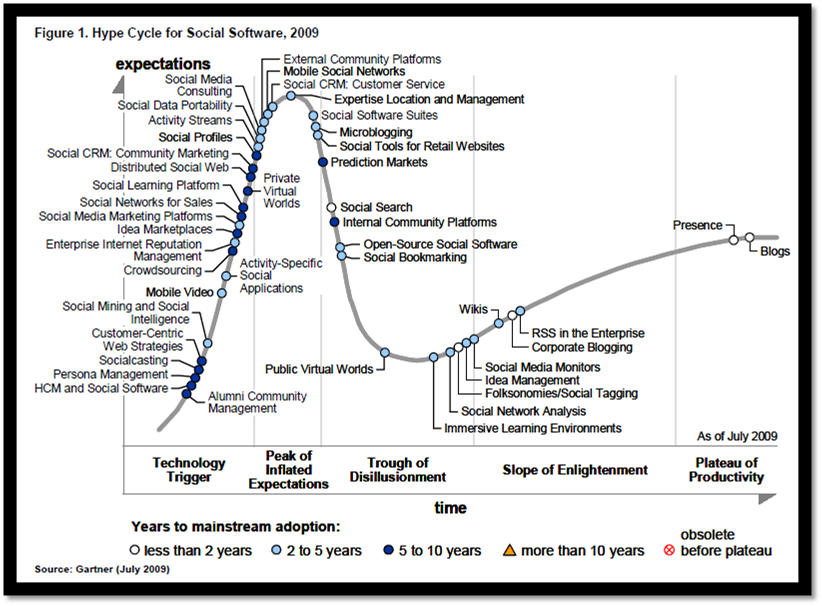
Check out this hype cycle - pretty sweet

Check out this hype cycle - pretty sweet

Share

, , , , , , , , , , , , , , , , , , , , ,

No Comments

Facebook Top 10 Rules – RoryMartin.com Social Media Marketing

As a Seattle Web Design company that specializes in Seattle Search Engine Optimization and Seattle Social Media Marketing, we like to keep you informed and up to date on what people are saying about Social Media tools like Facebook.

Below are some goods we feel you should know about:

If you are an Entrepreneur, or a business professional, you may want to consider these 10 notes below as they will make a difference in what you do on facebook.

1) The Rule of Visibility on Facebook.

You MUST be visible on facebook of you are going to get your message out. You must spend time on facebook and get to know people. You must put yourself together a “facebook blueprint” and work it. How many hours a week are you going to be seen on FB? How many times are you going to befriend someone this week? How many times are you going to upload photos this week? All of these things put you in the ‘Visibility Zone” on facebook, and on the radar as far as people on facebook. Be SEEN and be THERE on a daily basis.

2) The Rule of the Powerful Facebook Profile.

Why would people want to get to know you? One of the first things they check out is your facebook profile. What does it say- but better yet- what does it DO? Does it make people curious and want to get to know you? Does it make them think? Does it make them smile? Does it make them see that you have Value for their life and can help change it?

Powerful facebook profiles are NOT based on what is said in your profile- but what it DOES.

Does it direct them to DO something? Does it tell them you are person they MUST know? Or someone that has a nice picture and a nice profile- with no magnetism?  Put yourself OUT THERE and tell the world WHY they need you as a friend, and get them to take action towards YOU.

3) The Rule of the Facebook WALL.

You MUST use your Wall to market or message. many folks regard their Wall as a communication utility like email. It is not that. You already have a facebook email. The Wall is for you to BUILD- BRICK BY BRICK- MESSAGE BY MESSAGE- NOTE BY NOTE- VIDEO BY VIDEO- your Brand on Facebook. Every time something happens with you- it goes on your Wall. Don’t stare at the wall- CLIMB THE SUCKER and make your message the PEAK of the page- and keep yourself out there with the Wall. And answer the messages on your Wall. Thank people for sharing with you their visit or message. This will show up on THEIR wall. This will set you apart from most on facebook. The Wall is simply a BILLBOARD of what you are doing and your friends are doing on Facebook. Use it often and wisely.

4) The Rule of Your Facebook Network.

You are part of a local facebook network and you have access to that network to befriend them. I live in Birmingham Michigan, and the network i am a part of is the Detroit network. There are 640,926 people in my network that I could potentially MEET LIVE in a local place and get to know them and connect with them. You have local folks as well. Where do you find your network?

Click on “settings” and then click on “network.” You will find it there. This is a GOLD MINE of people in your local area to CONNECT and Construct new trust bridges that may lead to business down the road.

5) The Rule of the Facebook Notifications.

This is an overlooked and rarely talked about utility. Notifications are part of your “facebook email system.” Go to “email” at the top of your Facebook profile page, and then click on “notifications.”This is list of who is thinking about you, talking about you, including you in tags, and generally is pointing to you. This is a GOLD MINE of people that have PROVEN they are behind you and willing to make you a part of their Facebook experience. Pay attention to the facebook notifications. Thank them for their thoughts of you on their Wall and let them know you appreciate it. Include them as well on your tags and other activity on facebook. The notifications are GOLD and is a prospecting Vault of Leads. make sure you stay CONNECTED to them.

6) The Rule of Facebook Link Love.

The Link application on Facebookis a HOT commodity. It allows you to post a link that you like and then sends it out on the news feed that is on your home page. It picks up the image that you want on the link page, and allows it to be a LIVE link. Send out other people’s LINK and givem some LOVE. Do NOT just send out your own links. Let others do that. Find interesting links of others and send them out.

WHY? EXPOSURE for you. You will be given credit for the link. People LOVE link love. If you send out a LOT of other people’s links on facebook, they will start sending out YOUR links. Been there done that.

7) The Rule of Facebook Groups.

Join groups. Join a LOT of Groups. Start your OWN groups. The join MORE groups. Why? EXPOSURE. CONNECTION to other Group members. AUTHORITY. Start your own and be a Leader. REACH.Groups extend your reach into Facebook. MULTIPLIED PROSPECTS. There are more people in a group — then on a profile page.

Duh. Build a list in your own group and then you can become an admin and email messages to them. Make them messages of VALUE and interest.

8) The Rule of Facebook Events.

Attend events. Attend Events. and then attend MORE events. Why? It allows you to leave a message on the events page wall, and create exposure. I attend at least 2 facebookevents every week- to learn- and to network. Events can be found on the new Facebook page in the upper right under “Upcoming“-these are the events that are upcoming. One unique twist. You have birthdays under the “upcoming” tag- and you can send presents to folks. THIS will get their attention as it shows up on their wall and the news feed as well. Attend as many events as you can. make them worth your while- learn and grow from them. BUT–always leave a RSVP message about attending or not- with an encouraging message. This will show your professionalism, and caring.

Event UP! This will do you wll on facebook. Put the term “events” in the search box, and it will find every event that is going on in your network of friends- a GOLD MINE of new possibilties of business. Become a master of events!

9) The Rule of Facebook Multimedia- Videos and Photos.

People LOVE photos and videos. They are the most looked at and watched pages on facebook. Make some videos and upload them. Upload some photographs. Not only will the be seen on your wall and the facebook news feed, but also will allow you to “tag” others on these. This means that you can pick out people you have befriended and let them know you are thinking of them. And when you tag someone- it shows up on THEIR wall. Not isn’t THAT cool? It is called EXPOSURE!

10) The Rule of the Facebook NEWS FEED.

This is the big kahuna of Exposure on facebook. This gets you out to ALL of your friends and creates a massive exposure vehicle that can keep your brand in front and recognized. You also will be many times on the “featured” part of the new news feed on the right. This gives you HUGE exposure. Whatever you do, like change your status, upload a video, write and publish a note, or just comment on another person’s message on the facebook news feed- it SHOWS UP in the news Feed. Be seen- and be seen often if you are trying to brand yourself on facebook.

Yes, you need to establish relationships, and build community. But if you are going to MARKET on facebook-then you need to at least get a guideline of what and how to do it. The 10 Social Media Rules of Facebook hopefully gave you some idea in your social media marketing

Share

, , , , , , , , , , , , , , , , , , , , , , , , , , , ,

No Comments