
Posts Tagged mobile web
Seattle Web Development – Setting a Budget for Mobile
Posted by Rory Martin in Web Design and Development on May 2, 2014
Mobile friendly is the web trend of 2014, mainly because web visits from mobile devices have skyrocketed up to nearly 50 percent. With that in mind, half of your potential web traffic could be from a mobile device, meaning that if your website isn’t loading quickly for phone and tablet users, you are loosing viable sales and leads by the handful. Unfortunately, you might not have any real idea of what to spend on your website upgrades for making your site mobile friendly. If that sounds like you, keep reading these tips from your Seattle web development team to find out how you can settle on a budget.
Consider Your ROI
The first thing to consider is how much you can afford to spend for your mobile budget. Sure, you could say ‘nothing’, and that is the easiest answer, but try taking a look at your web analytics. Google Analytics is fine. How many of your visitors are from mobile? How many of them turn into sales? How high is your exit rate (people leaving within 3 seconds?), and how high is your conversion rate for computer users? If you have a 0.03% conversion rate with a low number like 1,000 browser visits a day, and 30% of your visits are from a mobile, but they’re all exiting fairly quickly, your looking at one extra sale a day from your mobile users. That’s not taking into account that mobile users are usually looking to make a purchase, or that most websites have an average conversion rate of 2-3%, and sometimes more like 10%. With those statistics in mind, you could be looking at an extra 9 sales per day, rather than 1. If you’re selling low budget items that earn you a median of $3 per, that’s still an extra $27 a day, and if you’re earning more like $10, that’s up to an additional $90 a day, or an extra $21,000 a year if you’re sales are consistent. You may be driving more or less traffic, but you can probably see how you can use your current data to estimate a basic ROI.
Use that ROI
Once you have your estimated ROI in hand, you can use it to set your budget. First, you can’t rely on your estimated ROI to be static. For example, you may or may not drive the same number of sales every day, your sales may go up, and you might change products. There are a lot of variables, so you cannot rely on earning that specific amount of money. Instead, use it as a generalization. Usually, it’s best to hedge your bets and go on the safe side by spending less than you would earn in a 6 month period. So, for example, if you were making an extra $300 a month with mobile sales, you could estimate that if you spend $1200 on making your website mobile friendly, you’re still around $600 under what you could potentially earn with your estimated ROI.
Want to know more? Contact us at Rory Martin to find out how our Seattle web development team can get you ready for mobile traffic.

The Mobile Craze Hits the Web & The Seattle Web Design Industry in 2014
Posted by Rory Martin in Web Design and Development on December 23, 2013
Most of us know that web design is about as static as SEO, meaning that it’s about as far from as it is possible to get. The industry is constantly changing and updating according to online trends, and anyone who wants to stay ahead in Seattle’s competitive e-commerce market knows that. Today, it isn’t hard to see where the newest trends are coming from, and that is mobile. At the moment, more people in the U.S. have smart phones than not, and considering that more than 20% of search is now mobile, it’s hard to ignore that the gadgets are taking over. In fact, with most of the new smart-watches now hitting the market early in 2014, and new tablets that are more affordable than laptops, mobile search is one of the fastest growing industries in marketing. But while this obviously affects your SEO, it also affects your web design in more ways than one. With that in mind, the following include a few of the important changes in the Seattle web design industry, and how they affect you now, and in 2014.

Flash Is Out
Flash based websites are popular and pretty on the web, although they do have trouble in some browsers, but the truth is that many of them simply do not work in mobile browsers. For that reason, anyone with a purely flash website is committing web-design suicide because mobile users might just see a fancy white page and nothing else. If you do want to go with flash, you have to work with your designer to cross test on multiple popular mobile web browsers in order to ensure that your site is fully functional across all platforms.
Responsive Web Design is No Longer an Option
Responsive web design first became popular a few years ago as a good way to boost your mobile popularity. The technique essentially utilizes adaptive code that changes size and shape to suit the browser and screen size it is displayed on. While in 2012, this was purely optional as the majority of search was still on the web, today, it can mean the difference between a potential sale and an unusually high mobile bounce rate. Make sure that your website resizes and looks good, no matter what sort of device your traffic is on. If you don’t feel like creating responsive theme variations for each and every device, you can take a look at your analytics (Google Analytics works) to see which devices are most common. For most, iOS including the iPhone, iPad, and iPad Mini) and Android are the two most common, but keep in mind that screen sizes vary across the most popular OS as well.
Speed
Did you know that the average web user will leave a page if it hasn’t loaded within 3 to 5 seconds? While mobile users are slightly more patient due to the restrictions of mobile Internet, their patience is also very finite. For this reason, you have to ensure that your web pages load as quickly as possible so that mobile users don’t leave before the page even finishes loading.
Depending on your website, you might need a lot of changed, you might need a new website, and you might already be good to go. Wherever you think you are, consider monitoring your mobile traffic and if you have a high exit rate, consider having a chat with your Seattle web design company to talk about responsive and mobile friendly design otpions.
Mobile Is Taking Over the Web – Are You Ready?
Posted by Rory Martin in Web Design and Development on March 29, 2013
If you’ve ever stopped for a moment to look up a website, store, or restaurant on your phone or tablet, then you’re not alone. Statistics show that more and more consumers are using their mobile phone to research and purchase items online, while websites aren’t really catching up to the trend. In fact, a study in early 2013 shows that 51% of people are more willing to make a purchase from a site with mobile optimized content, but only about 4.8% of applicable sites actually have mobile optimization. With this in mind, jumping on the mobile bandwagon could benefit you more than you might think. Mobile web development services are often more affordable than original website creation, and you can likely use most of your original web design.

Mobile Search to Surpass PC Search by 2014
Experts in mobile and standard search have been saying it since 2011, and are still saying it now in 2013. Mobile Search is expected to surpass computer based searches by 2014, even if it is as little as 1%. Currently consumer based searches on mobiles are at 41% compared to 59% on computers, meaning that mobile doesn’t have too far to catch up. Combined with the eye opening stats on purchases and research, going mobile could be very important for your site.
What is a Mobile Website?
So what is a mobile website? Chances are if you’ve ever taken a moment to research something on the web and you came across an impossibly small website with floating social share buttons in the way, or popup ads that were impossible to close, then your immediate response was to leave. Chances are that this site looked great on a web browser, but on your phone, it’s almost impossible to read.
A mobile website is one that has been designed with mobile use in mind. Typically there are no sidebars and are optimized for smaller screens with single row wider text that can be read more easily. Ads, if any, should be inserted between lines of text rather than on the side, and anything that floats should typically be removed.
If you aren’t sure how to go about creating a mobile website for your site, you can check with a web developer and ask about using canonical URLs to ensure there is no duplicate content on your site.
Is Mobile Optimization Right For You?
While only about 4.8% of websites have mobile optimized pages, mobile optimization isn’t for everyone. Not every site can benefit from utilizing mobile search, so it is always important to look into the facts before spending your time and money. Popular tools such as How to Go Mobile can be used to calculate how much each mobile click is worth to you, so that you can decide whether or not optimizing for mobile use is good for you. For example, a study by Adidas showed that every mobile search was worth $3.60 because 1 in 5 searchers ended up as a customer.
Create an Eye-Catching Site with Innovative Web Design
Posted by Rory Martin in Web Design and Development on August 15, 2012
At RoryMartin.com, we put a lot of time and effort into web design and development, because we recognize the importance of the website as your introduction to the world. With people using the web for everything nowadays – research, communication, shopping, networking – a website must work hard to attract and keep an audience.
The perfect website should be unique, yet recognizable
This means that the site should be different enough from its competitors to be memorable and exciting, but that traditional features which appear on many sites should be in obvious and expected places. Have you noticed that Login buttons on social media sites are almost always in the top right? People will naturally gravitate to that area to log in or sign up to your site, and if it’s not there, they will become frustrated at having to search for it.
The perfect website should be easy to navigate
Web users expect to be able to achieve most things on-line in two or three clicks. If they search ‘Comedy nights’ and your website comes up, but listings aren’t immediately available in two clicks (or less!) they will quickly head somewhere else – and this is bad news for your Bounce Rate. A good website should also be completely navigable from within the site; this means that a user should never have to click their browser’s back button! These are the kinds of issues which usually asrise during the testing process, and are quickly resolved.
The perfect website should be eye-catching, but not overwhelming
When you want your website to stand out, it can be tempting to make the headers even bigger, use lots of different fonts and throw photos at it like confetti. Users who arrive at a site like this quite literally will not know where to look! At RoryMartin.com, we like to keep things slick and simple.
Against this background, a different header font or announcement photo will have a greater impact on audience attention.
The perfect website should be clear about its purpose
Do you design stained glass windows, wash windows, install double-glazing, or sell glass paints? When a web user can reach your site by searching very common terms, it pays to have a tagline which makes the purpose of your site clear. This might increase the bounce rate of visitors to the site, but it will also prevent people associating your site (and services) with being a waste of time!
The perfect website should be up-to-date
Most sites will have a copyright notice in their footer. If people are going to trust your site, then this copyright certainly needs to be up-to-date! Another way of appearing up to date is to have a regularly scheduled blog, or social media accounts displayed on the page, which are updated every day, or near enough. This immediately lets people know that someone is on the other end of this website, and that it’s easy to get in touch with them.
At RoryMartin.com, we put a lot of time and energy into web design and development, in order to build amazing sites that mirror your business strategy. Talk to one of our Seattle web design experts today about what we can do for you.
Optimize Your Mobile Site for SEO and Reach a Wider Audience
Posted by Rory Martin in Search Engine Optimization, Social Media Marketing on May 18, 2012
With 1.2 billion mobile web users using their smartphones to search the internet every day, you need to make sure that your mobile site is grasping and keeping the attention of your audience. Here at RoryMartin.com, we strive to bring you the latest news and information on SEO and Social Media strategy, and we have advice for you on how to correctly optimize your mobile web site for the best user experience.
First off, think about why a user would come to your mobile site. What information are they looking for while on the move? Brands like Walgreens understand that most mobile users are looking for their nearest store, so location search is firmly at the top of their mobile site. Develop a searcher persona of a mobile user based on keyword, demographic and psychographic research. Motivations of this user ought to be the basis of your mobile site.
Once you have a site filled with content appropriate for mobile users, it’s time to think about SEO. Late last year, Google introduced a smartphone bot which access mobile sites in a similar way to iPhones, but they have been rather reticent on how the bot likes mobile sites to be optimized. Luckily, SEO experts out there have been working on figuring this out. Much of what is true for desktop SEO is true for mobile SEO: avoid duplicate content, avoid black hat techniques, and make sure your pages have tags relevant to the content.
However, there is one issue with mobile sites which might find your site ranking a little too low for your liking and that is 404 errors and misdirects. There is a risk that Google’s new smartphone crawler may be overly literal at first, and rely exclusively on the redirects that are in place, but not evaluate other signals or algorithmic elements. 404 errors on the mobile web can occur from something as typical as trailing slashes, or a misplaced capital in the url. Having lots of these errors on your site hinders crawling and indexing, and can cast your mobile site in a bad light. Check your content frequently for indexed 404 errors in Webmaster Tools to catch these issues as they arise, especially when adding more pages and redirects.
Finally: splash screens. There are a lot of people who think it’s a great idea to have a splash screen when someone first accesses their mobile site. We definitely want people to see something amazing when they come to our mobile site but from an SEO point of view, splash pages are a terrible idea, and their main effect is to cause visitors to leave your site!
If all of this seems a little too complicated, rest assured that we at RoryMartin.com are just waiting to work with you to improve the search engine optimization of your mobile site, and give you and your audience the benefit of our experience in social media marketing.
The World, in Social Networks
Posted by Rory Martin in Social Media Marketing, Social Networking on June 24, 2011
We found a cool infographic from Vincenzo Cosenza’s blog (Vincos.it) showing the world in Social Networks. Vincenzo says,
Facebook is slowing gaining users around the world (almost 700 millions) establishing its leadership in 119 out of 134 countries analyzed (in this edition I’ve added Ethiopia and Tanzania).
Europe has now became the largest continent on Facebook with 205 million users…
It’s interesting to look at how these numbers have changed this year.
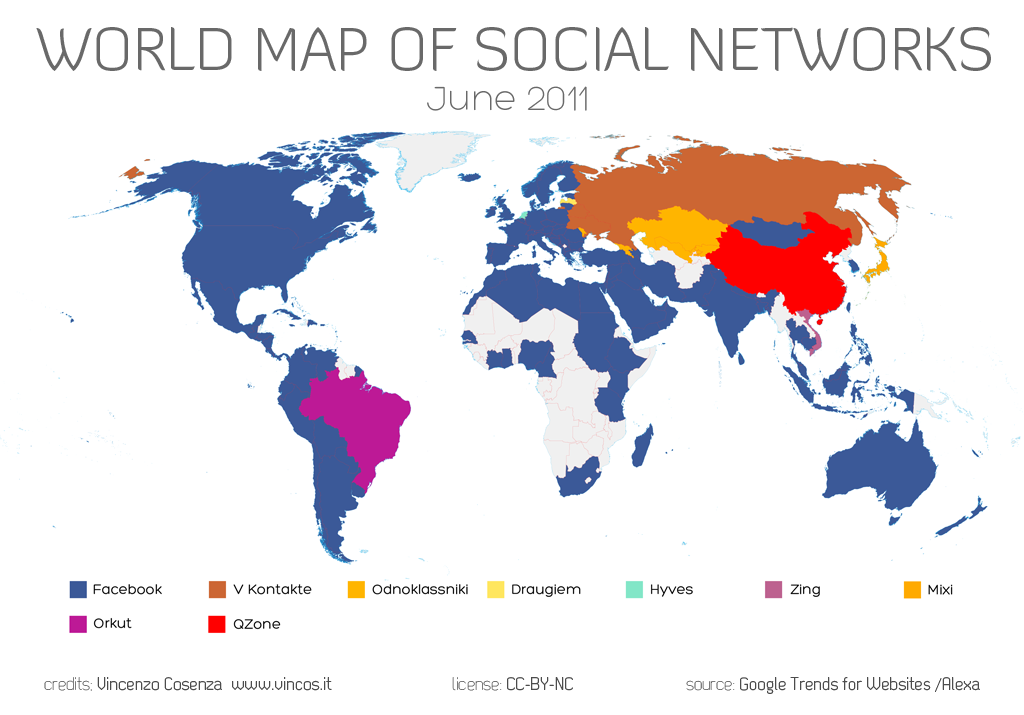
Facebook is by far the social network winner here, so we encourage our clients to make sure they have a solid presence on Facebook and are actively engaging their customers. Need to know what goes into your Facebook strategy? In this article we tell you how to make an impact on Facebook.
RoryMartin.com is that secret weapon that will revolutionize the way you engage with your clients and end-users. We offer a comprehensive set of services from website design and web development to search engine optimization, search engine marketing and social media marketing for companies large and small.
The Periodic Table of SEO
Posted by Rory Martin in Search Engine Optimization on June 10, 2011
We found something cool today – from the folks over at SearchEngineLand, who say:
Search engine optimization — SEO — may seem like alchemy to the uninitiated. But there is a science to it. Search engines reward pages with the right combination of ranking factors, or “signals.” SEO is about ensuring your content generates the right type of signals.
They put together the Periodic Table of SEO to help readers get a visual idea of what goes into producing the right ranking factors that make your website shine. At Rory Martin, we take all the factors into consideration when we’re building a strategy for SEO, online marketing and social media management. Since we often talk about how important SEO and Keywords are to your website’s value, we figured you (our readers) would be interested in this graphic too! (Click the image for a larger view)

As a Seattle Web Design company that specializes in Seattle Search Engine Optimization and Seattle Social Media Marketing, RoryMartin.com is dedicated to helping you find the right tools to optimize your website, and bring you the most exposure to help your business succeed.
Trend Forecast: Social Media’s Immediate Future
Posted by Rory Martin in Social Media Marketing on June 7, 2011

There are big trends happening in Social Media right now, from the use of scanned location check-in points, to social commerce. It can be hard to navigate the trends but we’ve compiled a few of the most common themes into 3 predictions on where social media is headed in second half of 2011.
Social, Mobile Entertainment –
Games have moved onto mobile devices, now that smartphones are relatively inexpensive, prevalent and readily available. Social media is giving users a way to take their entertainment on the go. Now instead of filling out a crossword while commuting, you may use Words With Friends. Or you might make a game out of being in the right place at the right time through Foursquare – ousting your friends, and letting people know where to find you. It’s a way to stay connected with other users while managing a busy lifestyle, from Facebook gaming to sharing last night’s football or Mad Men highlights over Twitter, even watching YouTube videos via an Android application. It’s entertainment to go, and integrating more social technology into your business and website will make it much more appealing to social media users.
Scanning, Scanning, Scanning –
When you’re using check-in services like FourSquare and the Facebook places application, you may be able to scan a barcode or QR code, checking you into your location on relevant social sites. With the emergence of social scanning, it’ll only be a matter of time until you can scan a barcode, which adds a “Like” to the business’s Facebook Page, or pulls up the latest Yelp Reviews and Groupon coupons for the location you’re at. It’s a business strategy – integrating social media and marketing in an easy-to-use way.
Mobile Workplace –
As smartphones become better and faster, we’re seeing users move from laptop to mobile (as desktops have been pushed out of the way for smaller, lighter ways to work-on-the-go). This means websites need to plan for mobile content that will load quickly on a mobile network. Businesses should start looking for ways to accept mobile payment, and will have to consider dynamic pricing to keep up with supply and demand. And since smartphones often double as media storage devices, it won’t be hard to keep your PowerPoint presentations handy for your next business meeting.
These are a few of our predictions for the coming year – companies will want to work these trends into their social media marketing strategy. At RoryMartin.com we do the research on tips, tricks and tools of the trade when it comes to SEO, online marketing and social media management. As a Seattle Web Design company that specializes in Seattle Search Engine Optimization and Seattle Social Media Marketing, RoryMartin.com can help you build a Social Media Strategy that reflects your unique brand and meets your business goals.
Social Media Marketing – The Value of Business Blogging
Posted by Rory Martin in Search Engine Optimization, Social Media Marketing on April 29, 2011
There is a common misconception among business owners as to the value of business blogging. Many believe that they do not have time to effectively implement a Social Media Marketing campaign or that there is little return on investment. RoryMartin.com a Seattle Web Design company that specializes in Seattle Search Engine Optimization and Seattle Social Media Marketing can help you build a marketing strategy that reflects your unique brand and meets your business goals.
A corporate blog is a marketing asset and therefore, an asset to your business. Properly executed, a blog will continue to drive traffic and leads to your business over time and should be viewed just like Search Engine Optimization, a due diligence process that is not a short term experiment, but a long term investment.
There are many reasons to consider a business blog. By delivering fresh, compelling, keyword-rich, original content you will bring users back to your site on a regular basis, helping increase awareness for your brand and driving your site up in ranking. In addition to gaining search engine ranking and generating leads, blogs engage your current customers and place you in a position to provide thought leadership to your industry, strengthening your brand.
Optimizing a blog that engages customers and prospects while furthering your company’s mission and business objectives, is much like optimizing a website. By implementing search engine optimization, your blog can rank much higher than static website pages in the search engine results. Over time, this drives up the ranking of your company website.
In order to measure Social Media ROI you must define clear measurable goals. RoryMartin.com’s online marketing campaigns deliver both measurable revenue as well as ancillary brand building benefits for your company. It is important to understand the value of a visitor. Each visitor becomes one of three things; a browser, an influencer or a transacting customer. A transacting customer delivers immediate financial impact which can be measured as ROI. Browsers and influencers are measured as ancillary even though they directly affect your financial bottom line, just not in the immediate sense. Their value falls into the category of non-actualized potential.
Some of the most substantial benefits of a social media campaign will be difficult to measure directly. There is no concrete financial value that can be assigned to reputation management, branding and customer service. However, every business owners knows those values are indispensable.
5 Seattle Small Biz Web Design Trends to Watch
Posted by Rory Martin in Web Design and Development on August 16, 2010
 This post originally appeared on the American Express OPEN Forum, where Mashable regularly contributes articles about leveraging social media and technology in small business.
The importance of having an attractive website that converts visitors into buyers and helps cleverly promote your small business is essential in these fiercely competitive times.
Your website has to capture a visitor’s attention, entice him or her to stay and browse around, create an interest in your product or service, and result in sales. For small businesses with limited time and budgets, design is an essential factor in both attracting and converting potential customers.
With this in mind, here are five current design trends that most small businesses can utilize to great effect.
Let us know in the comments below about any additional design trends that you have spotted in the small business world.
1. Minimalism

While this web design style has been popular for some time, it’s worth revisiting as no small business owner wants to turn visitors away with a cluttered, overbearing and hard to navigate website.
Minimalist design effectively strips away the excess and helps the user concentrate squarely on the content. If a page has too many elements, the user will easily become confused about where to focus on, with many elements vying for attention.
With page weight now affecting your Google ( ) search engine position, it’s the perfect time to reassess how streamlined your design is.
There are several principles and steps you can follow to create a more minimalist design:
- Go through your site and prune any unnecessary widgets or elements which aren’t serving a real purpose.
- Make good use of whitespace, which is the space between different elements of a design. Used well, it will allow for easier scanning of your site and help frame the elements on each page.
- With fewer elements, choosing the right color palette or accent color is critical. As color has great significance and meaning, it’s best to test how certain colors interact with each other.
- Browse your site through the eyes of your visitors, evaluating if there is too much information, confusing or off-putting elements, or sufficient calls to action. Answering these types of questions truthfully will help you prioritize the essential elements.
A minimalist design doesn’t have to be bland and boring; it can easily be modern, fresh, sophisticated, elegant or refined, based solely on the details within the design.
2. Unique Photography

Two men shaking hands, a group of people in suits sharing a joke, the call center girl: these are all tired, clichéd images that litter thousands of business websites. These types of images fail to convey either information on the company or a sense of the site’s character, and are essentially meaningless.
Using custom photography or artwork whenever possible is recommended, though for small business owners, both time and budget are limited and stock photos are a relatively cheap and accessible resource.
So when choosing stock imagery, it’s best to keep in mind these four tips:
- Research your competitors and industry and take note of the images used. You can then find a unique way to represent your product or service.
- Avoid being too literal in your choice of imagery as abstract compositions often give a more dramatic and memorable effect.
- Don’t always opt for the cheaper low-res image, as pixelated imagery devalues your overall design and looks unprofessional.
- Veer away from the bland and predictable and let the images ‘break out of the box’.
Imaginative imagery will reinforce your brand message and add greater character to your website. So, when you must use stock imagery, do so with great care and take the time to find the right piece that will convey the true personality of your service or product.
3. Bold Typography

Web design at its core is about communication, and typography is a vital component of that. Great web typography helps bring order to information and creates a coherent, visually satisfying experience that engages the reader without their knowing.
A recent trend is the use of big, bold typography which helps to create contrast between other text while grabbing a user’s attention. Oversized text can help create hierarchy and ensure users understand your message loud and clear.
In order to utilize typography to create a bold statement, keep in mind the following tips:
- Determine the single most important message you want to emphasize, as too many messages can lead to choice paralysis. Understand the qualities of the message you are trying to convey, and then look for typefaces that embody those qualities.
- Choose a typeface that will match the character of your work. For instance, if your company embodies the feel of an Old Style font, you should consider Bembo, Garamond and Sabon. It will also greatly depend on what you want to convey with the type, because legibility is as important as the character of the type.
- Give the typography the prominent position it deserves by surrounding it with a generous amount of whitespace. This will add emphasis and create even more focus on the typography.
- Test () out some of the various font replacement options such as Typekit or Typotheque. These allow you to license fonts to embed within your site, and help you to experiment with beautiful typography.
 )
)Typography is an art and the decisions you make are subjective; however, carefully selecting a typeface can make a huge difference to the quality of your design.
4. Clear Calls to Action

As a small business owner you want your visitors to complete a certain task when they land on your page. It could be to download, sign up or checkout, but these calls to action are one of the most important (and overlooked) elements in a small business website.
You want to grab your visitor’s attention and move him or her to take action. Crafting a clear, concise call to action is essential.
Here are four tips to keep in mind when designing a call-to-action button or advertisement:
- Language: Keep the wording short and snappy (always start with a verb), but also explain the value behind the action the user is taking. In some instances it also helps to create a sense of urgency using words such as ‘now’, ‘hurry’ and ‘offer ends,’ with ‘free’ being the number one incentive.
- Positioning: Ideally, calls to action should be above the fold, and be placed on every page of the site in a consistent position. For instance, Squarespace () (shown above), not only has a large call-to-action button at the top of the page, but also has a slightly smaller button in the footer of every page.
- Color: The color should make the call stand out from the rest of the design. Brighter, more contrasting colors usually work best for smaller buttons. For larger buttons, you may want to choose a less prominent color (but one that still stands out from your background), so as to balance out its size.
- Size: The call-to-action button should be the largest button on any given page. You want it to be large enough to stand out without overwhelming the rest of the design
 )
)RoryMartin.com – a Seattle Web Design company that specializes in Seattle Search Engine Optimization and Seattle Social Media Marketing, we follow these types of processes…for more information please visit our site at RoryMartin.com
- .
It’s vital you test different combinations of call-to-action buttons and see how each affects your conversion rates (see A/B Testing below). It’s also best to make sure they fit within your overall design.
5. A/B Testing

With competition growing fiercer online, it’s important for small businesses to have a website that converts visitors to buyers and creates a competitive edge. That’s why it is important to continually measure and improve site performance, usability and conversions.
One of the foremost ways of optimizing your web design is via A/B testing (sometimes referred to as split testing). An A/B test examines the effectiveness of one landing page over another. The two versions are randomly shown to site visitors to see which generates the best results. You then evaluate the performance of each and use the best version.
Various elements can be tested, including, layouts, copy, graphics, fonts, headlines, offers, icons, colors and more. Here are a few tips for A/B testing:
- Clearly define your goal before beginning any test. For example, if you wanted to increase sign-ups, you might want to test the following: type of fields in the form, length of the form, and display of privacy policy.
- Start with elements that will have the biggest impact for minimum effort. For instance, you could tweak the copy on your checkout button to see if conversions can be improved.
- Don’t use A/B testing in isolation as this alone won’t give you a well-rounded picture of your users. Instead, use other feedback tools, such as Feedback Army or User Testing, in conjunction with A/B testing to get in-depth analysis of user behavior.
A/B testing won’t make a bad design great, but it will prove an effective aid in optimizing your current design’s usability and conversions until you decide to overhaul your website design completely.
These are just five web design trends that small businesses can take part in to enhance their websites. Which web design changes would make the most sense for your small business?
More Web Design Resources on Mashable
– 10 Free Web UI Kits and Resources for Designers
– 10 Free and Fun Twitter Bird Icons for your Website
– HOW TO: Implement Google Font API on Your Website
– Top 10 Accessories for Typography Nuts [PICS]
– 10 Beautiful and Free WordPress 3.0-Ready Themes
Recent Comments